

Table of Contents
- The Modern Customer Journey Starts (and Often Ends) Online
- DIY Platforms: When “Cheap and Fast” Makes Sense (And When It Doesn’t)
- WordPress + Professional Setup: The Goldilocks Solution for Most Contractors
- Custom Agency Websites: When Your Site Needs to Be a Revenue-Generating Machine
- Beyond the Build: What You’ll Actually Pay to Keep Your Website Running
- Key Takeaways
In today’s digital-first world, your website isn’t just a nice-to-have—it’s your most hardworking employee. For contractors and home service professionals, a website serves as your 24/7 digital storefront, your lead generation engine, and often the first (and sometimes only) impression potential customers have of your business.
But here’s the problem: the pricing landscape is confusing. You can build a website for $200, $2,000, or $20,000+. So what’s the right investment for your business?
The answer isn’t simple, because not all websites are created equal. The real question isn’t “How much does a website cost?” but rather “What kind of website will actually grow my business, and what should I expect to pay for it?”
Consider this: 97% of consumers learn about local companies online before making a decision, and 87% specifically use Google to evaluate local businesses. If your website doesn’t meet their expectations in those critical first few seconds, you’ve lost the job before you even knew it existed.
In this guide, we’ll break down the three main website options available to contractors, what you should realistically budget for each, and—most importantly—how to calculate the actual return on investment so you can make a decision based on business growth, not just upfront cost.
The Modern Customer Journey Starts (and Often Ends) Online

Before we discuss costs, you need to understand why investing in a professional website isn’t optional anymore—it’s the foundation of your business growth strategy.
The Death of the Phonebook
The way homeowners find contractors has fundamentally changed. “Near me” mobile searches have exploded, and consumers expect instant access to company information, reviews, and contact details. When a pipe bursts at 2 AM or a homeowner needs emergency roof repair, they’re not flipping through the Yellow Pages—they’re searching on their phone.
The data doesn’t lie: 97% of people learn more about a local company online than anywhere else. For contractors, this means your website is the new storefront, and if you’re not there, you simply don’t exist to the vast majority of potential customers.
First Impressions Happen in 0.05 Seconds
Research shows users form an opinion about your website—and by extension, your business—in just 50 milliseconds. That’s one-twentieth of a second. A poorly designed site can cost you the lead before they ever scroll.
Think about that for a moment. When a homeowner clicks on your website from a Google search, they’ve already decided whether they trust you before they’ve even read a single word. The color scheme, the professionalism of your photos, the clarity of your navigation—all of this registers instantaneously and creates an emotional response that determines whether they’ll explore further or hit the back button.
Trust is Everything
For a homeowner inviting a contractor into their personal space, credibility is paramount. 75% of consumers admit to judging a company’s credibility based on website design alone. An outdated or unprofessional site signals that your work might be similarly subpar.
This isn’t just about aesthetics—it’s about psychology. When someone is about to spend thousands of dollars on a new HVAC system or trust you to work on their roof, they need to feel confident in their choice. A website with stock photos from 2005, broken links, or an outdated design creates immediate doubt about whether you’re still in business or capable of delivering quality work.
The Cost of Invisibility
If your website isn’t optimized for local search, isn’t mobile-friendly, or lacks clear contact information, you’re invisible to the 87% of consumers actively searching online. That’s not a small slice of the market—that’s nearly everyone.
Even more telling: 44% of users will leave a website immediately if there’s no visible contact information. Imagine spending money on advertising to drive traffic to your site, only to lose nearly half of those visitors because they can’t quickly find your phone number or contact form. That’s not just a missed opportunity—that’s money directly out of your pocket.
Key Insight:
Your website isn’t a cost center—it’s a revenue generator. The question is whether you’re investing enough to make it work effectively.
DIY Platforms: When “Cheap and Fast” Makes Sense (And When It Doesn’t)
Platforms like Wix, Squarespace, and Weebly promise an affordable, quick website. But what are you actually getting for that $200-$1,000 per year?
What You Get
DIY website builders offer drag-and-drop simplicity, pre-built templates, hosting included, and the ability to launch a basic site in a weekend. For someone with zero technical knowledge, these platforms remove the intimidation factor and let you get something online quickly.
The appeal is obvious: low cost, immediate control, and no need to hire anyone. You can log in from anywhere, make changes to your text or swap out photos, and see the results instantly. For a brand-new business owner who’s testing the waters, this might seem like the perfect solution.
Cost Breakdown
The typical range is $200-$1,000 annually, which includes your domain name, hosting, and the builder subscription. Some platforms offer free versions with significant limitations (like ads on your site or a non-professional URL like “yourcompany.wixsite.com”), but most contractors will need at least the basic paid plan to remove those restrictions.
The Hidden Cost—Your Time
The “DIY” in DIY means you’re doing the work. For a busy contractor, the hours spent learning the platform, designing pages, writing content, and troubleshooting could be better spent running jobs, managing your crew, or following up with leads.
Let’s do some quick math: If your time is worth $100/hour (a conservative estimate for a skilled contractor) and you spend 20 hours building and refining your site, that’s $2,000 in opportunity cost. Suddenly, the “cheap” DIY option isn’t looking quite as affordable.
Functional Limitations
These platforms are built for mass appeal, not for the specific needs of a roofing company or HVAC contractor. Want a custom quote request form that integrates with your CRM? Advanced SEO control beyond basic meta descriptions? The ability to add complex functionality as your business grows? You’re often out of luck.
The templates are designed to work for everyone from photographers to yoga instructors to lawyers, which means they’re optimized for no one. The result is a generic online presence that looks like dozens of other contractor sites, offering no competitive differentiation.
SEO Performance Concerns
While these platforms have improved their search engine optimization capabilities, they often generate bloated code that search engines struggle to crawl efficiently, potentially limiting your visibility in Google search results. The sites tend to load more slowly than optimized alternatives, and you have limited control over technical SEO factors like schema markup or advanced site structure.
In a local market where you might be competing against a dozen other HVAC companies or roofers, even small SEO disadvantages can mean the difference between appearing on page one of Google or being buried on page three where no one will ever find you.
When This Option Makes Sense
- You’re a brand-new sole proprietor testing the market
- You need a simple “digital business card” with basic info
- You have no immediate lead generation goals
- Your budget is extremely tight and you have time to invest
When to Avoid It
- You’re an established business competing in a crowded local market
- Lead generation is a primary business goal
- You don’t have time to learn web design and ongoing maintenance
- You need your site to rank competitively in Google for local search terms
WordPress + Professional Setup: The Goldilocks Solution for Most Contractors

For established contractors who need a legitimate web presence without breaking the bank, a professionally built WordPress site using a quality theme offers the best balance of cost, functionality, and performance.
The WordPress Advantage
WordPress powers over 43% of all websites globally, making it the most robust, well-supported, and extensible platform available. It’s not a “website builder”—it’s a professional content management system used by everyone from small local businesses to Fortune 500 companies and major media outlets.
This market dominance means you have access to thousands of professional themes, tens of thousands of plugins that add functionality, and a massive community of developers constantly improving the platform. When you need to add a feature or fix a problem, solutions are readily available.
Cost Breakdown
The initial build typically ranges from $2,000-$10,000 as a one-time project fee, with annual costs of $500-$2,500 for hosting, security, and maintenance.
This investment gets you a professional web developer or small agency who will select an appropriate premium theme, customize it to match your brand, add your content, optimize the site for search engines, ensure mobile responsiveness, and set up essential plugins for contact forms, SEO, security, and performance.
What You’re Getting
Unlike a DIY site, a professionally built WordPress site is engineered for your specific business needs. The developer will ensure fast load times, proper SEO configuration, secure hosting, clean code, and a user experience designed to convert visitors into leads.
You’ll get a site that looks professional, loads quickly, ranks well in search engines, and includes features specifically designed for contractor businesses—like service area pages, project galleries, testimonial sections, and prominent contact forms.
Strong SEO Foundation
When properly configured, WordPress is exceptionally SEO-friendly. Access to plugins like Yoast SEO or Rank Math, fast-loading themes optimized for performance, and clean code structure give you a competitive edge in local search.
The platform gives you granular control over meta titles and descriptions, URL structures, image optimization, internal linking, and all the technical elements that Google uses to rank websites. This level of control simply isn’t available on most DIY platforms.
Flexibility and Scalability
As your business grows, your WordPress site can grow with you. Need to add a blog to establish authority in your market? Want to create detailed service pages for each city you operate in? Looking to add online booking functionality or a customer portal? It’s all achievable without rebuilding from scratch.
This scalability is a huge advantage over locked-in DIY platforms where you might outgrow the system’s capabilities and face the painful (and expensive) process of completely rebuilding your site on a different platform.
The Catch—Quality Matters
Theme bloat is real. Not all WordPress themes are created equal. Poorly coded or feature-heavy themes can drastically slow your site. Google data shows that as page load time increases from 1 to 3 seconds, bounce probability increases by 32%. Speed doesn’t just affect user experience—it directly impacts your search rankings and conversion rates.
This is why working with an experienced developer who understands performance optimization is crucial. They’ll select a lean, fast-loading theme and configure it properly rather than just installing the theme with the most bells and whistles.
Maintenance is Non-Negotiable
WordPress, its themes, and plugins require regular updates for security and compatibility. Neglecting this leaves your site vulnerable to hacks. Outdated components are the primary entry point for security breaches.
A hacked website doesn’t just go offline—it can be used to distribute malware, damage your reputation, get your domain blacklisted by Google, and expose customer data. The cost of recovering from a security breach far exceeds the cost of regular maintenance.
Most professional WordPress developers offer monthly maintenance plans ($50-$200/month) that include updates, backups, security monitoring, and support. This is money well spent for peace of mind and business continuity.
When This Option Makes Sense
- You’re an established contractor with consistent revenue
- You need a professional, lead-generating website
- You want strong SEO performance without a massive investment
- You’re willing to invest in ongoing maintenance (either DIY or through a maintenance plan)
When to Consider Upgrading
- You’re in a highly competitive market where differentiation is critical
- You have multiple service lines or locations requiring complex site architecture
- You want conversion rate optimization and advanced analytics built into the site from day one
- Your average job value is high enough to justify maximum investment in lead generation
Custom Agency Websites: When Your Site Needs to Be a Revenue-Generating Machine

For market-leading contractors and growth-focused businesses, a custom-built website designed by a professional agency isn’t an expense—it’s a strategic capital investment in a lead-generating asset.
Built Around Your Business Goals
Unlike templates designed for generic businesses, a custom site is architected specifically for your market, your ideal customer, and your revenue goals. Every element—from the user flow to call-to-action placement—is intentionally designed to convert visitors into paying customers.
The process begins with strategic discovery: understanding your competitive landscape, identifying what makes you different, analyzing your best customers, and determining the specific outcomes you need from your website. Only after this foundation is established does the design work begin.
Cost Breakdown
The initial build ranges from $10,000-$25,000+ as a one-time investment, with annual costs of $2,000-$6,000+ for comprehensive maintenance, updates, and support.
For many contractors, seeing that price tag triggers sticker shock. But when you understand what you’re getting and calculate the potential return, the investment makes perfect business sense.
What Justifies the Cost
Strategic discovery process: The agency researches your market, competitors, and customer personas before designing a single page. They analyze what messaging resonates with homeowners in your area, what features your competitors lack, and how to position your business for maximum impact.
Conversion-optimized design: Every element is built on proven UX/UI principles to maximize lead capture. This includes strategically placed contact forms, compelling calls-to-action, social proof placement, service descriptions that address customer pain points, and a visual hierarchy that guides visitors toward taking action.
Superior SEO architecture: Clean code, optimized site structure, fast load times, and schema markup designed to rank for competitive local keywords. The site is built from the ground up with search engines in mind, ensuring every page is optimized for both users and Google’s ranking algorithm.
Unique brand identity: Your site doesn’t look like your competitors—it reflects your unique value proposition. Custom photography, original graphics, and a distinctive design ensure you stand out in a crowded market rather than blending in with everyone else using the same template.
Ongoing Partnership
A quality agency like Lithium Marketing doesn’t disappear after launch. They provide performance monitoring, content strategy, and continuous optimization. They track which pages generate the most leads, test different calls-to-action, analyze user behavior, and make data-driven improvements to increase your conversion rate over time.
This ongoing relationship means your website continues to improve and adapt to changing market conditions, search engine updates, and customer preferences.
The ROI Case
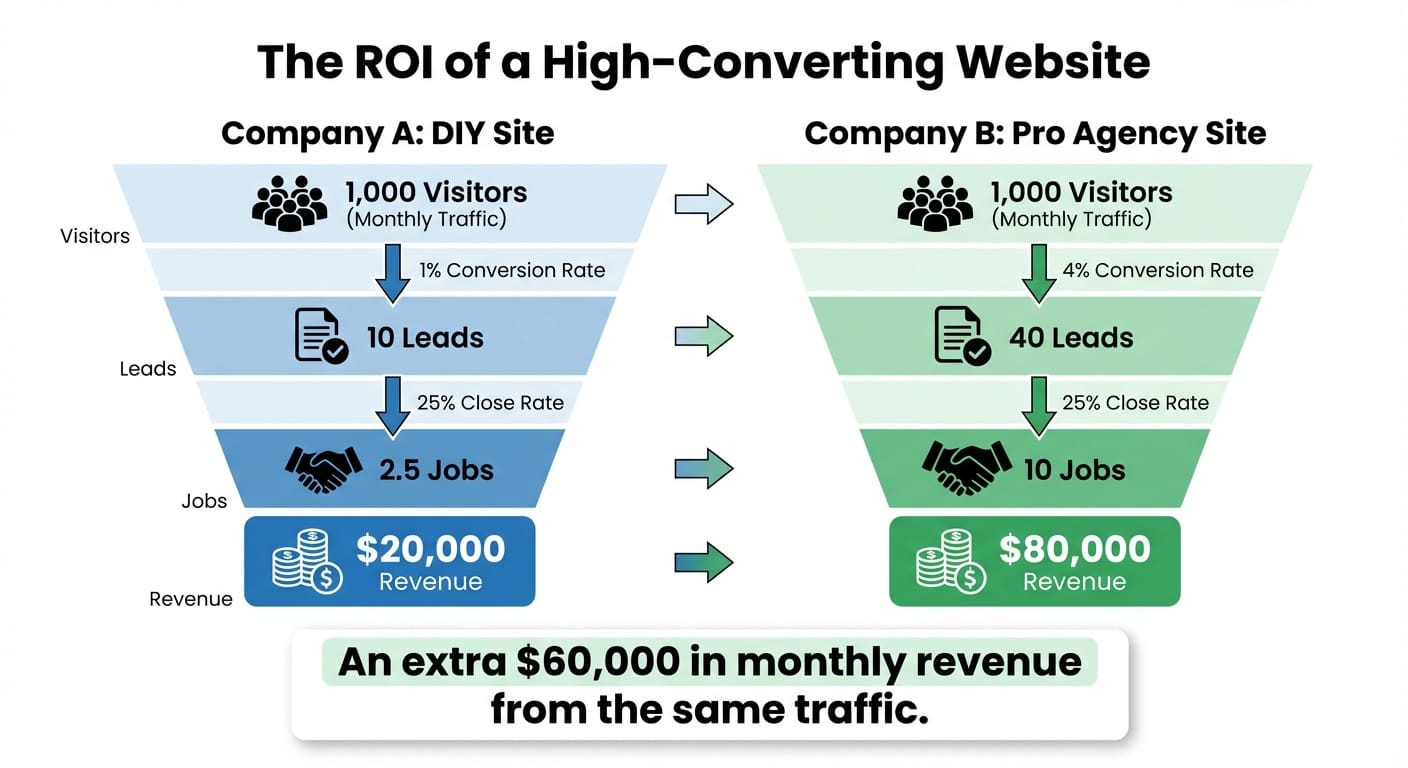
A well-designed, conversion-optimized website can improve conversion rates by up to 200%. Let’s illustrate this with a real-world scenario that shows why the higher investment makes financial sense.
Two roofing companies in the same city both drive 1,000 website visitors per month through Google Ads:
- Company A (DIY site): 1% conversion rate = 10 leads/month
- Company B (Custom agency site): 4% conversion rate = 40 leads/month
Assuming an average roofing job value of $8,000 and a 25% close rate:
- Company A: 2.5 jobs/month = $20,000 revenue
- Company B: 10 jobs/month = $80,000 revenue
Company B generates an additional $60,000 in monthly revenue from the same traffic. Over a year, that’s $720,000 in additional revenue—all because their website was designed to convert.
In this scenario, even a $25,000 website investment pays for itself in less than two weeks. Every month after that is pure additional profit that Company A is leaving on the table.
When This Option Makes Sense
- You view your website as your #1 marketing asset
- You operate in a competitive market and need to differentiate
- You have multiple locations or service lines requiring sophisticated site architecture
- You’re committed to long-term digital marketing and SEO investment
- Your average job value is high enough that a few additional monthly leads justify the investment
For contractors doing high-value work (commercial projects, luxury renovations, specialized services), the ROI calculation is even more compelling. A single additional project per month could generate $50,000+ in revenue, making even a substantial website investment trivial in comparison.
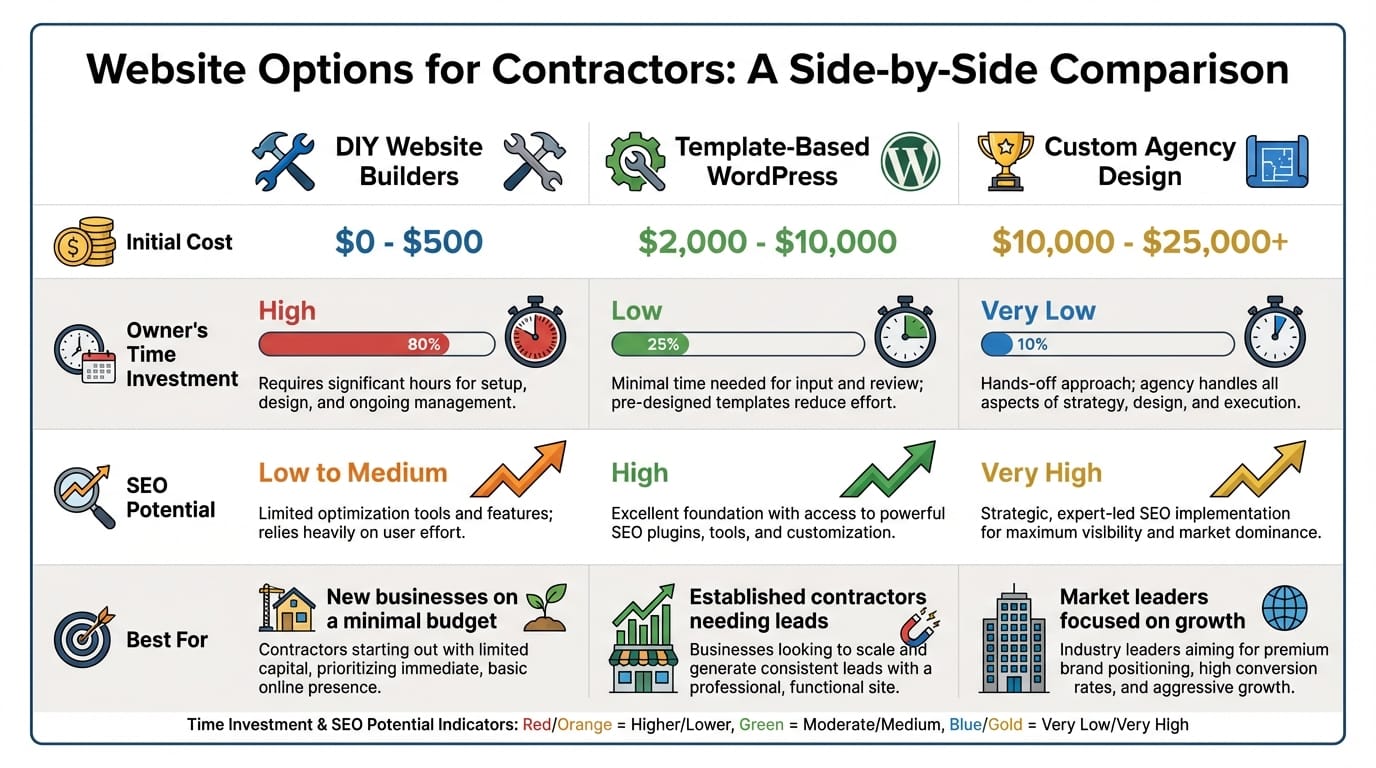
This comparison chart summarizes the key differences between your three primary options, helping you visualize which solution aligns with your business needs and growth goals.
Beyond the Build: What You’ll Actually Pay to Keep Your Website Running
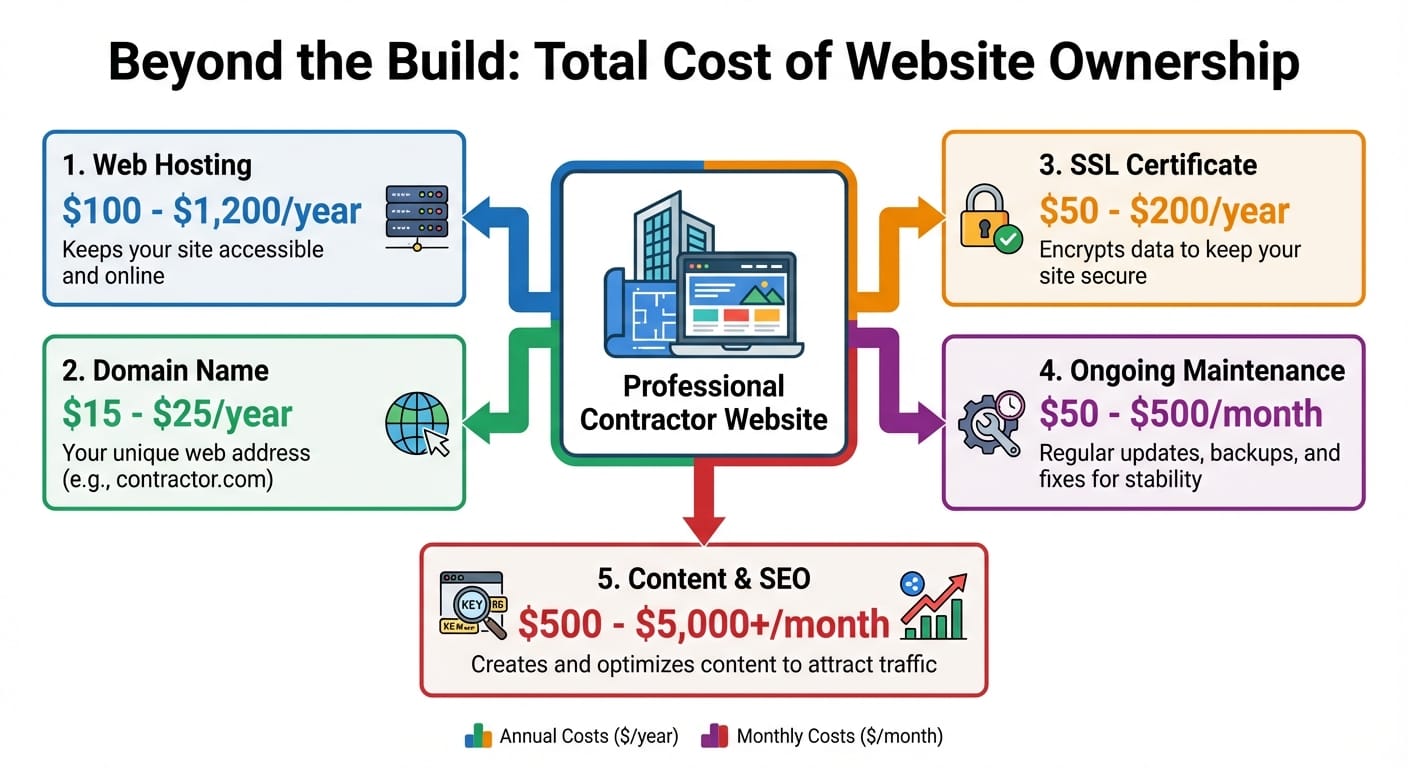
The biggest budgeting mistake contractors make is focusing only on the upfront design cost while ignoring the ongoing expenses that keep a website healthy, secure, and effective.
Domain Name
Your website’s address (e.g., yourcompany.com). This is the URL customers type into their browser or click on in search results. Cost: $15-$25 per year. This is a small expense, but it’s essential—without a domain, you have no website.
Web Hosting
The service that keeps your site accessible on the internet 24/7. Think of this as renting space on a server where your website files live.
- Shared hosting: ~$100-$300/year (suitable for low-traffic sites)
- Managed WordPress hosting: ~$300-$1,200/year (faster, more secure, better support)
Cheaper hosting might save money initially, but slow load times can cost you leads. Quality hosting ensures your site loads quickly, stays online consistently, and can handle traffic spikes without crashing.
SSL Certificate
The “https” lock icon that encrypts data between your website and visitors’ browsers. This is a confirmed Google ranking factor—sites without SSL are penalized in search results. Often included with hosting, but standalone certificates cost $50-$200/year.
Beyond SEO, SSL certificates build trust. Browsers now display warnings on sites without encryption, immediately scaring away potential customers who think your site might be unsafe.
Ongoing Maintenance
For WordPress sites, this is non-negotiable. Regular maintenance includes:
- Core software updates to patch security vulnerabilities
- Plugin and theme updates for compatibility and new features
- Regular backups in case of site failure
- Security monitoring to prevent hacks
- Performance optimization to maintain fast load times
Cost: $50-$500/month depending on service level
Why it matters:
Outdated components are the #1 entry point for website hacks. A security breach doesn’t just take your site offline—it can result in data theft, blacklisting by Google, malware distribution, and serious damage to your reputation.
Content and SEO
A website isn’t “set it and forget it.” To maintain and improve search rankings, you need ongoing investment in:
- Fresh content (blog posts, case studies, new project galleries)
- Ongoing SEO optimization (keyword research, technical improvements, link building)
- Performance monitoring and adjustments
- Local SEO management (Google Business Profile optimization, citation building)
Cost varies widely: $500-$5,000/month depending on market competitiveness and goals.
For contractors in competitive markets, consistent content creation and SEO work is the difference between ranking on page one of Google and being invisible. This isn’t an optional expense—it’s a mandatory investment if you want your website to generate leads consistently.
Budget Framework for Contractors
| Cost Category | DIY Builder | WordPress Template | Custom Agency |
|---|---|---|---|
| Year 1 Total | $200-$1,000 | $2,500-$12,500 | $12,000-$31,000+ |
| Ongoing Annual | $200-$1,000 | $500-$2,500 | $2,000-$6,000+ |
When budgeting for a website, think in terms of 3-5 year total cost of ownership, not just the initial build price. A $15,000 custom site that costs $3,000/year to maintain has a 5-year TCO of $27,000. That might sound like a lot until you calculate that it’s generating hundreds of thousands of dollars in additional revenue during that same period.
Key Takeaways
Your website is one of the most important investments you’ll make in your contracting business. The right choice isn’t about finding the cheapest option—it’s about finding the option that delivers the best return for your specific situation.
DIY builders work for brand-new businesses or those needing a simple placeholder, but they rarely generate meaningful leads in competitive markets. They’re fine for getting something online quickly, but they’re not a long-term growth solution.
Template-based WordPress sites offer the best balance for most established contractors: professional appearance, strong SEO foundation, and reasonable cost. This is the “Goldilocks zone” that works for the majority of home service businesses who want a legitimate web presence without six-figure investment.
Custom agency websites are strategic investments for growth-focused businesses where the website is a primary revenue driver—and the ROI can be substantial when built and maintained correctly. For established contractors serious about dominating their local market, this is the path that makes the most financial sense.
The Real Question
The real question isn’t “what’s the cheapest website?”—it’s “what’s the cost of not having a website that converts?”
When 97% of your potential customers are researching you online, and 87% are using Google to evaluate your business, an underperforming website isn’t saving you money—it’s costing you jobs every single day.
Every week that passes with a subpar website is another week where potential customers are choosing your competitors because their online presence looks more professional, trustworthy, and capable.
Don’t Budget Based on What You Want to Spend
Budget based on what you want to achieve. A $15,000 website that generates $500,000 in annual revenue is a far better investment than a $500 site that generates nothing.
The contractors who win in today’s market are those who understand that digital presence isn’t an expense—it’s an investment in growth. They calculate ROI rather than just comparing price tags, and they make decisions based on business outcomes rather than trying to minimize costs.
Ready to Take the Next Step?
At Lithium Marketing, we specialize in building high-performance websites for contractors and home service professionals. Whether you need a strategic custom build or want to discuss upgrading your existing site, we’d love to help you create a digital presence that actually grows your business.
Ready to Invest in a Website That Generates Revenue?
Let’s discuss how a professionally designed website can transform your contractor business and deliver measurable ROI.
References:
- SEO Tribunal – 28+ Local Search Statistics to Lead You to the Top. https://seotribunal.com/blog/stats-about-local-search/
- BrightLocal – Local Consumer Review Survey 2023. https://www.brightlocal.com/research/local-consumer-review-survey/
- Google Ads Help – About “near me” searches. https://support.google.com/google-ads/answer/9980070?hl=en
- Stanford Persuasive Technology Lab – Stanford Guidelines for Web Credibility. http://credibility.stanford.edu/guidelines/
- Behaviour & Information Technology – Attention web designers: You have 50 milliseconds to make a good first impression! https://www.tandfonline.com/doi/abs/10.1080/01449290500330448
- KoMarketing – What B2B Buyers Want from a Vendor Website. https://www.komarketing.com/files/b2b-web-usability-report-2015.pdf
- Forbes Advisor – How Much Does A Website Cost In 2024? https://www.forbes.com/advisor/business/how-much-does-website-cost/
- Search Engine Journal – Are Website Builders Bad for SEO? https://www.searchenginejournal.com/website-builders-seo/413473/
- WebFX – How Much Should a Website Cost in 2024? https://www.webfx.com/website-design/how-much-should-web-site-cost.html
- W3Techs – Usage statistics of content management systems. https://w3techs.com/technologies/overview/content_management
- Think with Google – The State of Online Retail Performance. https://www.thinkwithgoogle.com/marketing-strategies/app-and-mobile/mobile-page-speed-new-industry-benchmarks/
- HubSpot – How Much Does a Website Cost? [2024 Pricing Guide]. https://blog.hubspot.com/website/website-cost
- U.S. Small Business Administration – Get a business website. https://www.sba.gov/business-guide/launch-your-business/get-business-website
- Sucuri – Hacked Website Trend Report 2021. https://sucuri.net/reports/2021-hacked-website-report/
- CXL – How to Design a Website That Converts. https://cxl.com/blog/how-to-design-a-website-that-converts/