
AI for San Francisco businesses
AI lead generation for San Francisco trades starts with answering every call.
An AI receptionist answers every call to your business in San Francisco 24/7, qualifies the lead and books the job for $179 a month.
- Picks up nights, weekends, holidays
- Qualifies callers with your questions
- Hands urgent calls to a real person
Calls start with a search
Searches for local trades in San Francisco each month
7,750
searches a month
- plumber san francisco3,600
- electrician san francisco880
- landscaping san francisco880
- pest control san francisco880
- roofing company san francisco720
- garage door repair san francisco590
Source: Google Ads keyword data, average monthly U.S. searches. "Under 10" = below Google’s reporting floor.
 Google PartnerView our Partners listing
5.0on Google · read our reviews
Google PartnerView our Partners listing
5.0on Google · read our reviews
Businesses
we’ve worked with
Businesses we’ve worked with
- Willard Power Vac
- Sarkinen Plumbing
- Robinson Restoration
- Town & Country Glass
- Dixie Glass
- Byers Septic Service
- F&W Fence Co.
- Drake’s 7 Dees
- Rickabaugh Construction
- Hillsview Building
- Dozer Dave
- Mt. Hood Pro Painting
- On-Target Landscape
- Atiyeh Bros Carpet
- Lovett
- Westmore Construction
- Northwest New Homes
- Porter Sealcoating & Paving
- RescueHero Restoration
- Panda Plumbing
- Biermann Plumbing & Heating
- Ballistic Junk Removal
- Smart Doors LLC
- Peak Performance Roofing
- Deluxe Heating & Cooling
- Lifetime Exteriors
- Bruce Johnson Construction
- Madrone Painting
- Smart Tree Service
- Premier Gutter Cover
- NW Pacific Electric
- Universal HVAC
- Lenny Martin Painting
- Next Level Decks & Exteriors
- Prodan Construction
- Smooth Rollin’ Sealcoating and Paving
- Lovett Restoration
- Greenlight Titles
- G.W. Hartley IV
- Advanced Coatings
- Thomson Equipment
- MyADU
Phone first
AI for San Francisco service businesses starts at the phone
Lithium Marketing gives San Francisco service businesses an AI receptionist to take calls and book appointments while their crews work. About 590 searches a month ask for “garage door repair san francisco”, and an ad click on that search averages $27.52. When a paid visit becomes a call, the receptionist can collect the job details, offer an appointment or transfer the caller under your rules.
Some calls cost even more to win: a click averages $32.99 for “pest control san francisco” and $50.22 for “water damage restoration san francisco”. If a caller like that hears voicemail, the next listing is one tap away, which is why the receptionist answers at 2 p.m. and 2 a.m. alike.
Where calls start
Where San Francisco calls come from
Not every call starts with an ad. Customers tap call from your Google Business Profile, from Yelp and from your website, and the receptionist answers each one in your company’s name, gets the details your team needs and books the job or texts the next step.
The receptionist also handles texts, photos included, and every call is recorded and transcribed, so you can check what each caller asked for and what they were told.
| Search | Cost per click |
|---|---|
| water damage restoration san francisco | $50.22 |
| plumber san francisco | $43.72 |
| pest control san francisco | $32.99 |
| hvac repair san francisco | $29.21 |
| garage door repair san francisco | $27.52 |
| electrician san francisco | $10.06 |
| roofing company san francisco | $9.20 |
| landscaping san francisco | $4.67 |
Source: Google Ads keyword data, average monthly U.S. searches. "Under 10" = below Google’s reporting floor.
- Map Pack
- The first thing on the page
- Search ads
- None recorded
- Local listing reviews
- 772 to 1,900 Google reviews each
- Directories in the top 10
- Facebook, Reddit, Thumbtack, Yelp
- AI Overview
- Not shown
- People also ask
- Shown
Source: one Google results page for “plumber san francisco”, as Google showed it to a searcher located in San Francisco. Search ad counts exclude sponsored local listings. Results shift by searcher and day.
Renters and quakes
Renters, quakes and the questions callers ask
San Francisco’s occupied homes have an owner-occupied share of 38.2%. A tenant calling about a leak may need a landlord to approve the repair, so the receptionist can ask who owns the property and collect that person’s contact details before your team follows up.
San Francisco sits near the San Andreas and Hayward Faults, and minor earthquakes occur on a regular basis. If an earthquake brings several repair calls together, unlimited concurrent calls let the receptionist answer them at once. Set the transfer and booking rules beforehand so urgent requests reach your team.
- residents (2025 estimate)
- 826,079
- residents (2025 estimate)
- population change, 2020 to 2025
- -6%
- population change, 2020 to 2025
- housing units
- 414,602
- housing units
- of occupied homes owner-occupied
- 38.2%
- of occupied homes owner-occupied
- of homes built before 1980
- 76.5%
- of homes built before 1980
- median home value
- $1,394,500
- median home value
Sources: U.S. Census Bureau 2025 population estimates, ACS 2020–2024 and 2023 County Business Patterns.
Scripts by trade
Same-day callers and estimate callers get different scripts
For a pest control company, one of 12 in San Francisco County, the script can ask what the pest is, where it is and whether there are pets or children in the home, then book the first open treatment visit. Plumbing and garage door calls get urgency questions, and your rules decide which go straight to the on-call tech.
Estimate trades need a different script. New home builders number 214 in San Francisco County. For builders, remodelers and landscapers, a caller’s project description and preferred timing help your estimator prepare; the receptionist can collect those details and offer a calendar opening.
County Business Patterns
Trade and home service businesses in San Francisco County
Establishments by industry, 2023
- Residential remodelers534
- New home builders214
- Electrical contractors176
- Plumbing, heating and air-conditioning contractors162
- Painting contractors133
- Landscaping services79
- Roofing contractors52
- Glass and glazing contractors26
Source: U.S. Census Bureau, 2023 County Business Patterns (NAICS establishment counts).
Going live
How a San Francisco line goes live on AI
You sign off on every rule, and the line goes live in days.
Sort your calls into types
Emergencies, estimates, existing customers and sales calls each get a rule: transfer, book, text or take a message.
Teach it your business
Your services, neighborhoods, hours and answers to common questions go into its knowledge base, in your own words, along with the voice you choose.
Check the scheduling connection
We confirm how your calendar or CRM can accept appointments before agreeing on the setup, then test the booking details and confirmation text. Custom integration work is scoped separately.
Call it, then read the transcripts
You call the line yourself before it goes live. Recordings and transcripts let us review what callers asked and adjust answers that need more detail.
What the AI receptionist does on every call
The same eight parts go into every AI receptionist setup, wherever the business is.
- Answers every call, 24/7
- Qualifies the lead
- Books the appointment
- Answers common questions
- Sends follow-up texts
- Captures every detail
- Transfers to a real person when needed
- Connects to your CRM and calendar
Real phone lines
AI phone work for a plumber and a garage door company
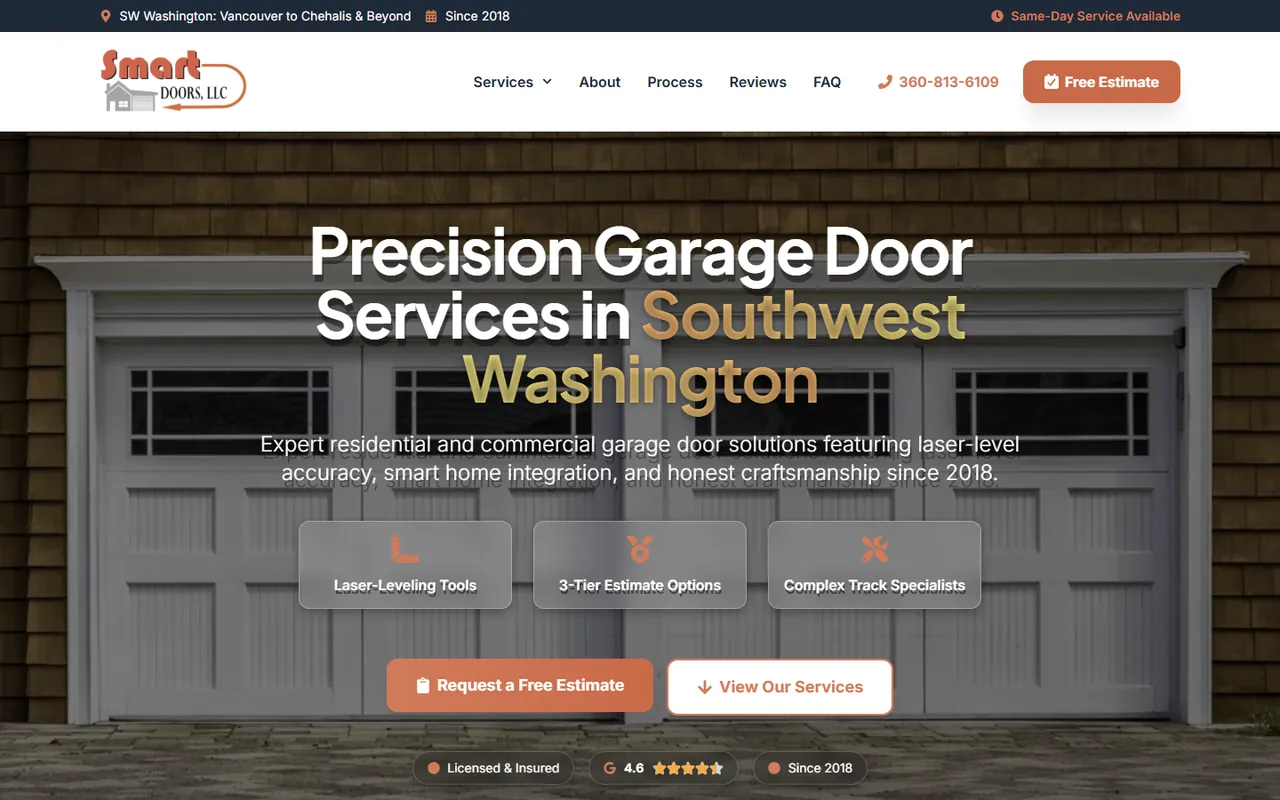
Urgent calls trigger an SMS to the on-call technician in the custom AI phone system Lithium built for an unnamed plumbing company; routine requests get booked. The accompanying screenshot shows another client’s website: Smart Doors LLC, a garage door business, hired Lithium for the site and later added the AI receptionist to its phone line.
AI phone project, plumbing company
3x
more leads
Calls from nearby
Covering calls from across the Bay
If you also take jobs in Daly City, Richmond, San Mateo, Berkeley, Oakland or Vallejo, list them in the receptionist’s service area and it checks each caller’s address against that list before booking. Each of those cities has an AI page below, and the Bay Area and California links lead to the rest.
Published price
$179 a month for San Francisco call answering
$179
per month, fully managed
No contract and no setup fee, so you can cancel anytime. The voice, knowledge base, call rules and calendar and CRM hooks are all set up by Lithium. Custom AI automation is scoped after a free discovery call.
FAQ
AI receptionist questions from San Francisco owners

Still curious?
Call (503) 766-5964 or email [email protected].
Is there a contract for the AI receptionist?
There’s no contract: it costs $179 a month, fully managed, with no setup fee, and you can cancel anytime. That lets you run it on your real calls for a while and keep it only if it books work.
What happens when a caller insists on talking to someone?
The receptionist can transfer the call to a number you choose. You decide which requests need your team, such as a change to an existing job or a pricing question it cannot answer. We test those transfers before launch and agree how to handle an unanswered transfer.
How does $179 a month compare with a front-desk hire?
Compare the responsibilities you need covered. Lithium’s published comparison for a human receptionist is $3,500 or more a month; the AI receptionist costs $179 a month and answers 24/7. It handles calls, booking and transfers. A staff member may have duties beyond answering the phone.
Can AI qualify leads beyond phone calls?
A custom lead qualification bot can collect project details before your estimator gets involved. For example, a remodeler could ask about the building and proposed work, then pass the answers into its CRM. Bring a lead through your current process on the free discovery call; we use that walkthrough to quote the automation separately. Typical builds take one to two weeks.
Can I hear it before I sign up?
Call the demo line in the contact section and Lithium’s own AI receptionist answers. Ask it what your customers ask, then decide. If you like what you hear, a co-founder can map out your own call rules with you on a short video call.
Free action plan
Turn last week’s missed San Francisco calls into a call plan
Pull up last week’s missed calls and voicemails. On a short video call, a co-founder will walk through them with you and set out which ones the receptionist should book, text or transfer.
What we’ll cover
- What’s working (and what isn’t) in your current marketing
- Site and funnel gaps that are costing you leads
- Local SEO and paid traffic opportunities
- Simple tracking and KPIs to measure success
2000 NE 42nd Ave Ste D Unit 2370, Portland, OR 97213
Prefer to pick a time? Book a 30-minute call with DJ