
Table of Contents
- The Make-or-Break Decision: Service Area vs. Hybrid Business Classification
- The Geographic Optimization Battle: Why Named Locations Beat Radius Settings
- The “Digital Leash”: How Google’s Proximity Factor Limits Your Ranking Radius
- Structured Data: The Technical Bridge Between Your GBP and Website
- Breaking the Digital Leash: How Location Pages Compensate for Proximity Limitations
- When Things Go Wrong: Recovering from GBP Suspensions
- Final Thoughts
For service area businesses like plumbers, electricians, HVAC technicians, and mobile locksmiths, local SEO presents a fundamental challenge: you operate by traveling to customers, yet Google’s algorithms are anchored to physical proximity. This creates a critical tension between how your business actually operates and how Google’s systems evaluate and rank you. The stakes are high. Google blocked or removed over 7 million fake business profiles in a single year, making compliance with their guidelines non-negotiable. Even a well-intentioned configuration mistake can result in suspension, wiping out years of accumulated reviews and visibility overnight. This guide addresses the core paradox facing service area businesses: even when you hide your address from public view, Google still knows your exact verification coordinates—creating an invisible “digital leash” that limits your ranking radius. Your service area settings tell Google where you’re willing to travel, not where you have ranking authority. Whether you’re a business owner managing your own Google Business Profile or a marketer handling multiple client accounts, this comprehensive roadmap will show you how to configure your profile for maximum visibility while maintaining strict compliance with Google’s evolving requirements.
The Make-or-Break Decision: Service Area vs. Hybrid Business Classification
Your business classification is the single most critical configuration decision you’ll make. Misclassification is the leading cause of profile suspensions, and Google’s enforcement systems are unforgiving.
Service Area Business (SAB) Definition
A Service Area Business visits or delivers to customers but does NOT serve customers at their business address. Think of a home-based plumber, mobile dog groomer, or traveling massage therapist. If customers never come to your location, you’re an SAB. The mandatory requirement: Your address MUST be hidden from public view on Google Maps. This isn’t optional. Many business owners resist hiding their address, believing it builds trust to display a physical location. However, displaying a residential address for commercial operations triggers algorithmic flags and frequently attracts competitor reports.
Hybrid Business Definition
A Hybrid Business serves customers at their physical location AND travels to customers. Examples include an auto mechanic with a shop who also offers mobile roadside service, or a retail store that provides delivery. To qualify as hybrid, you must have permanent signage and staff present during your stated business hours. If you meet these requirements, you can display your address AND set service areas simultaneously.
The Prohibited Address Trap
One of the most common suspension triggers is using addresses that don’t represent where your business actually operates. P.O. Boxes, UPS Stores, and virtual offices (Regus, WeWork, etc.) are strictly prohibited for verification purposes. Your verification address must be where your business physically operates and can receive official mail. For home-based businesses, this means using your actual residential address for verification—then hiding it from public view if you’re classified as an SAB.
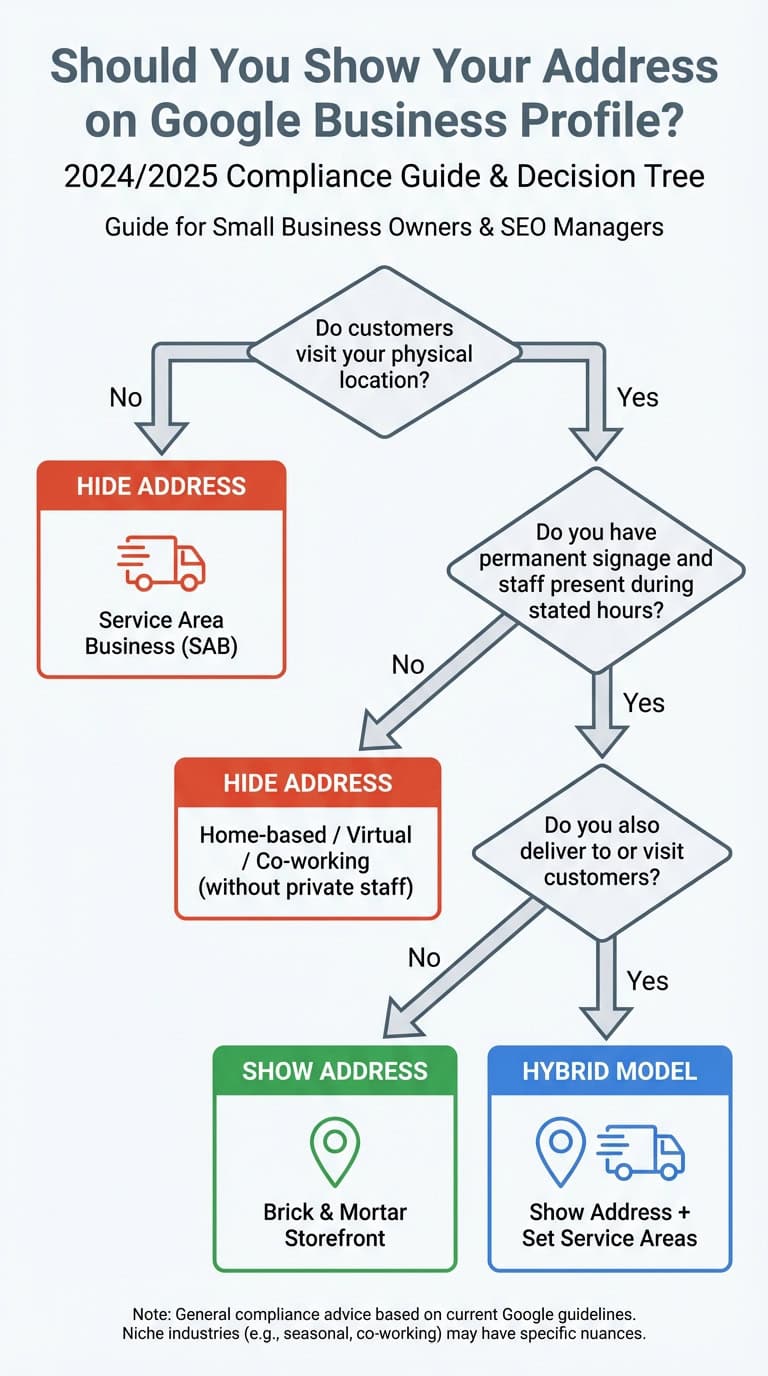
With over 7 million fake profiles removed annually, Google has adopted a zero-tolerance approach to non-compliant listings. Proper classification isn’t just about following rules—it’s about survival in an aggressively policed environment.
The Geographic Optimization Battle: Why Named Locations Beat Radius Settings
Once you’ve properly classified your business, your next critical decision is how to configure your service areas. Google offers two methods: radius-based targeting or selecting specific cities and zip codes. Industry research and algorithmic behavior patterns reveal a clear winner.
The Radius Method: Quick but Vague
The radius method lets you draw a circle around your verification point—for example, a 20-mile radius. This approach offers quick setup and automatically covers expanding areas, making it attractive for businesses in truly rural settings where specific municipalities don’t define service patterns. However, radius targeting comes with significant disadvantages:
- Vague geographic signal: A radius provides Google’s Knowledge Graph with imprecise information about where you actually operate
- Irrelevant coverage: Your circle often includes areas you don’t service (bodies of water, neighboring states, zones outside your actual territory)
- Search intent mismatch: Users search for “plumber in Tampa,” not “plumber within 15 miles”—radius targeting doesn’t align with how people actually look for services
The Named Locations Method: Precision and Relevance
The named locations method requires manually selecting specific cities, counties, or zip codes from Google’s directory. You’re limited to a maximum of 20 service areas per profile, and attempting to circumvent this restriction triggers suspension. This approach delivers substantial advantages:
- Higher algorithmic specificity: Named locations send explicit relevance signals to Google’s entity recognition systems, creating stronger associations between your business and specific geographic areas
- Search intent alignment: This method matches how users actually search for services, improving your chances of appearing for relevant queries
- Competitive differentiation: Selecting specific markets demonstrates genuine focus rather than generic coverage claims
Leading Local SEO research indicates that named locations provide cleaner data to Google’s Knowledge Graph. When you explicitly associate your business with “Tampa,” “Clearwater,” and “St. Petersburg,” you create entity-level connections that radius targeting simply cannot match.
Strategic Selection Approach
When choosing your service areas:
- Prioritize proven markets: Focus on cities where you have existing customer testimonials or completed projects that you can showcase
- Validate search volume: Use Google Ads Keyword Planner to confirm sufficient search demand in each target city
- Quality over quantity: Targeting 8 cities with dedicated marketing outperforms vaguely targeting 20
- Consider competition: In densely competitive markets, focusing resources on fewer areas yields better results than spreading thin across maximum coverage
| Configuration Method | Pros | Cons | Best For |
|---|---|---|---|
| Radius (Distance) | Quick setup; covers gaps between cities | Vague signal; includes irrelevant zones | Rural businesses with truly undefined service patterns |
| Named Locations (Cities/Zips) | Precise relevance signals; matches search intent | Manual setup; 20-area cap | Urban/suburban SABs targeting specific municipalities |
The “Digital Leash”: How Google’s Proximity Factor Limits Your Ranking Radius
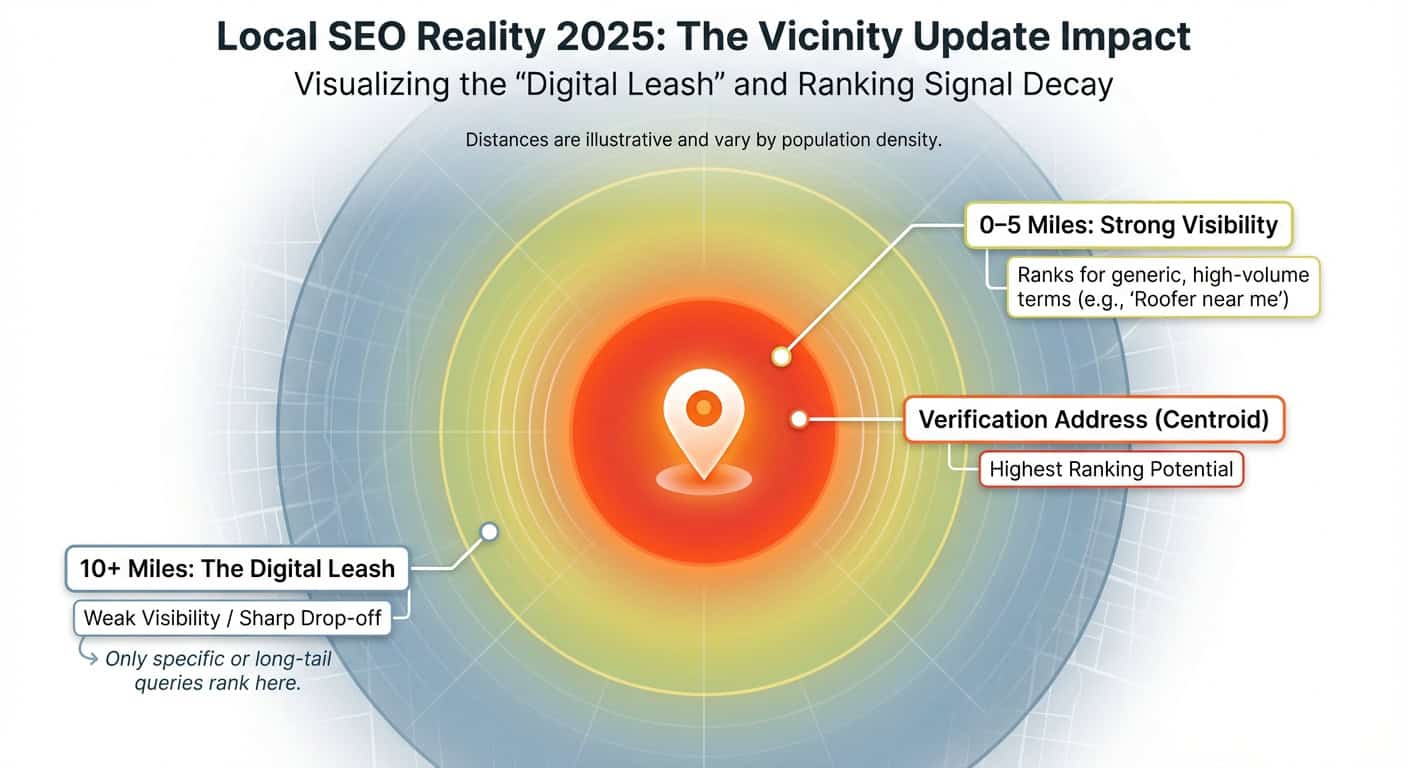
Even with your address hidden from public view, Google knows your exact verification coordinates. The 2021 Vicinity Update fundamentally changed how distance from that verification point affects your visibility, creating an invisible ranking boundary that service area settings alone cannot overcome.
The Vicinity Update Explained
In late 2021, Google significantly increased the algorithmic weight of the searcher’s distance from your business’s verified location. Service area businesses found it dramatically harder to rank in Map Pack results for cities 10 miles or more from their verification point. The update prioritized “true proximity” over service area claims and even domain authority. This meant that established businesses with strong websites could suddenly lose visibility in distant markets where they’d previously ranked well.
The “Bullseye Effect”: Ranking Decay by Distance
Think of your verification coordinates as the center of a target, with your ranking potential diminishing as you move away from the bullseye:
- Center (0-3 miles): Maximum ranking potential for generic queries like “plumber near me”
- 5-Mile Radius: Strong visibility maintained for most service-related searches
- 10-Mile Radius: Visibility drops significantly unless the query is highly specific or includes your brand name
- 15+ Miles: Minimal Map Pack visibility regardless of your service area settings
Why Service Areas Don’t Override Proximity
Think of service areas as “opt-in zones” rather than “ranking territories.” They indicate your willingness to serve an area but don’t move you up in results for distant locations. The proximity calculation still anchors to your verification coordinates.
The Hidden Address Paradox
While customers can’t see your address on Google Maps, Google’s algorithm absolutely uses those verification coordinates as the “home base” for proximity calculations. This creates what we call the “digital leash”—an invisible tether limiting your organic reach through the Map Pack.
Real-World Implications for Service Area Businesses
Consider a plumber based in St. Petersburg attempting to serve Tampa, 20 miles away. Regardless of adding Tampa to the service area list, that plumber will struggle to appear in the Tampa Map Pack for generic searches like “plumber” or “emergency plumbing.” The business might appear for highly specific searches (“St. Petersburg plumber serving Tampa”) or branded queries, but the general local pack remains largely inaccessible. This proximity limitation requires a different solution: comprehensive website optimization.
Structured Data: The Technical Bridge Between Your GBP and Website
To combat the limitations of a hidden address and proximity decay, service area businesses must use Schema.org structured data to explicitly define their service geography for search crawlers. This creates entity-level geographic associations that extend beyond your Google Business Profile.
The Strategic Purpose of Schema for SABs
While your GBP hides your address from customers, your website must explicitly communicate service areas to search engines. Schema markup creates machine-readable geographic associations between your business entity and service locations, helping connect your website’s organic authority to entity geographic relevance.
The areaServed Property: Critical Implementation
Use the LocalBusiness schema type, or more specific subtypes like Plumber, Electrician, or PestControlService. The areaServed property should list specific cities, counties, and zip codes rather than vague descriptions. Format options include:
- City references (e.g., “Tampa, FL”)
- GeoShape for more complex boundaries
- Multiple
areaServedproperties for multiple cities
Avoid: Using radius descriptions or vague terms like “Tampa Bay area”
JSON-LD Implementation Example
{ "@context": "https://schema.org", "@type": "PlumbingService", "name": "Your Plumbing Company", "areaServed": [ { "@type": "City", "name": "Tampa", "addressRegion": "FL" }, { "@type": "City", "name": "St. Petersburg", "addressRegion": "FL" } ] }Strategic Benefits
Implementing structured data:
- Reinforces your GBP service area signals at the website level
- Helps Google associate your business entity with specific geographic entities in the Knowledge Graph
- Supports location page optimization
- Validates that your service area claims are backed by actual website infrastructure
Implementation Best Practices
- Place schema strategically: Add it to your homepage and all location pages
- Maintain synchronization: Keep schema aligned with your GBP service area selections
- Validate regularly: Use Google’s Rich Results Test tool to ensure proper implementation
- Update promptly: When service areas change, update schema immediately
Breaking the Digital Leash: How Location Pages Compensate for Proximity Limitations
Since GBP configuration alone cannot overcome the Vicinity Update’s proximity restrictions, service area businesses must build a comprehensive website strategy featuring optimized location pages. These pages can rank organically in markets where the Map Pack excludes you.
The Location Page Framework
Strategic purpose: Organic search results are less sensitive to proximity than Map Pack results. A well-optimized location page can rank on Page 1 even when your GBP doesn’t appear in the local 3-pack. This creates dedicated landing pages for each priority service city, capturing traffic through traditional blue-link results.
URL Structure Best Practices
Use a clean, descriptive pattern: yourdomain.com/[service]-[city] Examples:
lithiumseo.lithium.design/plumbing-services-tampalithiumseo.lithium.design/electrician-clearwaterlithiumseo.lithium.design/hvac-repair-st-petersburg
This hierarchy signals both topical and geographic relevance to search engines.
Content Requirements: Avoiding “Doorway Page” Penalties
Google penalizes pages that are carbon copies with only city names swapped. Each location page must include genuinely unique content: Essential elements:
- Unique value propositions specific to that market
- Photos of completed projects in that city (with embedded location metadata)
- Testimonials from customers in that specific area
- Locally relevant schema markup using both
areaServedandaddressproperties - City-specific service information (local permit requirements, common regional issues, seasonal considerations)
- Embedded Google Map showing the service area
- 800-1,200 words of unique content per page
The Review Localization Strategy
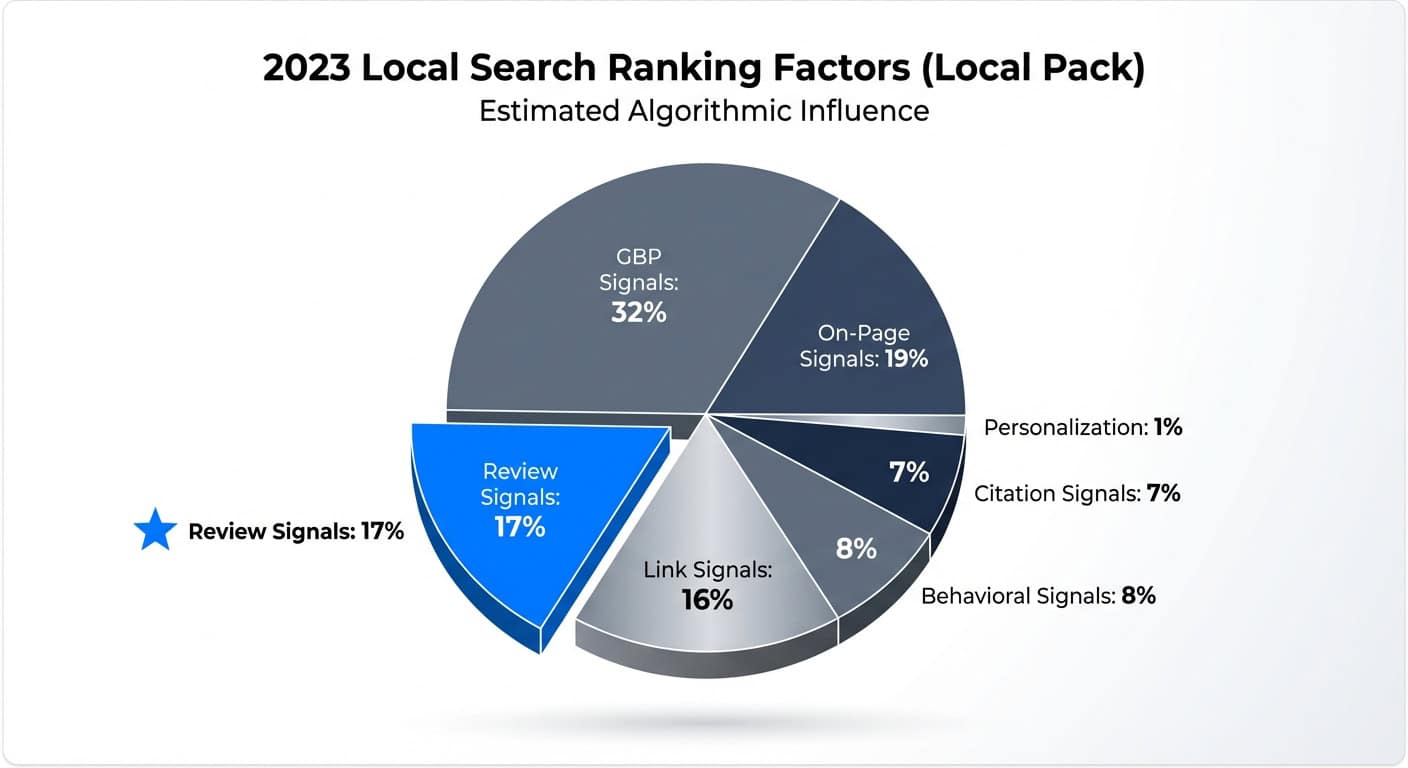
Review signals account for approximately 17% of local pack ranking factors. For service area businesses, the content of those reviews matters tremendously.
Request that customers in specific service cities mention their neighborhood or city in reviews. For example:
- Generic: “Great service, very professional”
- Localized: “Great job fixing my sink in Largo—arrived quickly and solved the problem”
These localized review mentions create additional geographic association signals that strengthen your entity’s connection to specific markets.
Case Study: The Hybrid Approach
Business: High-end landscaping company in St. Petersburg, FL with residential verification address Challenge: Invisible in Map Pack for “Landscape Design Tampa” (20 miles away) due to Vicinity Update. While the service area included Tampa, the proximity factor prevented rankings. Implementation:
- GBP Configuration: Switched from 25-mile radius to specific cities (St. Petersburg, Tampa, Clearwater, Largo)
- Website Development: Created dedicated “Tampa Landscape Design” page featuring:
- Photo gallery of projects in Tampa neighborhoods (Hyde Park, Ybor City, Palma Ceia)
- Testimonials from Tampa clients mentioning specific neighborhoods
- Content about Tampa-specific landscaping considerations (soil types, HOA requirements, hurricane-resistant design)
- Embedded schema markup identifying Tampa as an area served
- Review Strategy: Requested Tampa clients mention their neighborhood in Google reviews
Results:
- Organic location page reached Page 1 for “Landscape Design Tampa” within 4 months
- Captured traffic the Map Pack excluded the business from
- 22% increase in leads from the Tampa secondary market over 6 months
Key Takeaway: The location page succeeded where GBP couldn’t, demonstrating the essential role of website optimization for distant service areas. The business didn’t fight Google’s proximity algorithms—they worked around them through strategic content development.
When Things Go Wrong: Recovering from GBP Suspensions
Understanding common suspension triggers and the recovery process is essential for service area businesses. Even well-intentioned configuration mistakes can result in profile removal, and knowing the recovery roadmap can save weeks of lost visibility.
Case Study: The Suspension Recovery
Business: Plumbing company in Chicago The Violation:
- Set service area to the entire state of Illinois (massive overreach signaling spam)
- Used UPS Store address to appear “downtown” and closer to target market
- Attempted to game the proximity factor through a fake address
The Consequence:
- Listing suspended for “Deceptive Content”
- Complete loss of Map Pack visibility
- Loss of access to accumulated reviews (temporarily inaccessible during suspension)
The Recovery Process:
- Address Correction: Updated to owner’s actual home address and properly configured it as hidden (appropriate SAB classification)
- Service Area Refinement: Reduced from “Illinois” to 15 specific zip codes surrounding the actual location
- Documentation Submission:
- Utility bill matching the home address
- Business license showing the same address
- Photos of business equipment and service vehicle with address visible
- Reinstatement Request: Filed through Google Business Profile support with all documentation attached
Timeline: Listing reinstated within 14 days Surprising Outcome: Initial panic about “losing territory” proved unfounded. The conversion rate actually increased 15% because the listing now appeared to highly relevant, truly local users rather than generating low-quality inquiries from searchers 50+ miles away who would never convert.
Prevention Checklist
Protect your profile from suspension by following these critical guidelines:
- ✅ Use your actual business address (even if home-based)
- ✅ Hide address if you’re a true SAB (no customer visits)
- ✅ Limit service areas to realistic, serviceable locations (maximum 20)
- ✅ Never use virtual offices, P.O. boxes, or UPS stores
- ✅ Ensure phone number is unique to the business
- ✅ Keep name consistent across all platforms (NAP consistency)
- ✅ Respond to user-suggested edits promptly
- ✅ Document your actual business operations with photos
The key to avoiding suspension is operating in good faith: represent your business accurately, use real addresses, and set realistic service areas. Google’s algorithms are designed to detect deception, not penalize legitimate businesses following guidelines.
Final Thoughts
For service area businesses, the Google Business Profile serves as a relevance signaling tool rather than a geographic ranking override. Understanding this fundamental distinction is critical to developing realistic expectations and effective strategies. The core realities:
The most successful service area businesses don’t fight Google’s proximity algorithms—they work within them through smart GBP configuration while leveraging website SEO to expand their geographic reach. This dual-platform approach, combining entity-level optimization with strategic content marketing, creates sustainable visibility across multiple service markets.
Your Next Steps
Is your Google Business Profile properly configured for your service model? Are you maximizing visibility in your priority markets while maintaining strict compliance with Google’s guidelines?
Ready to Optimize Your Local SEO Strategy?
Lithium Marketing specializes in local SEO strategy for service area businesses. We help plumbers, electricians, HVAC companies, and other mobile service providers navigate the complex intersection of GBP optimization, website development, and multi-market visibility strategies.
Audit your current configuration and develop a comprehensive visibility plan that balances compliance with growth objectives.
References:
- Google Business Profile Help. (2024). Service Area Business Guidelines. https://support.google.com/business/answer/9157481
- Google The Keyword Blog. (2022). How we fought fake business profiles in 2021. https://blog.google/products/maps/how-we-fought-fake-business-profiles-2021/
- Search Engine Journal. (2023). Do Virtual Offices Violate Google Business Profile Guidelines? https://www.searchenginejournal.com/virtual-offices-google-business-profile/476541/
- Whitespark. (2023). The 2023 Local Search Ranking Factors. https://whitespark.ca/local-search-ranking-factors/
- BrightLocal. (2023). How to Set Up