

Table of Contents
For plumbers, electricians, and local consultants, the traditional website homepage has largely been replaced by the Google Business Profile (GBP). With “near me” searches skyrocketing by over 136% in recent years, your GBP is often the only interaction a customer needs to hire you. In fact, over 65% of Google searches now end without a click to a website because customers convert directly from the profile—calling you or requesting directions straight from the map. However, this dominance comes with a risk. A sudden suspension can erase your business from Google Maps overnight, halting leads and revenue instantly. Many business owners are blindsided, unaware that minor data discrepancies or innocent mistakes can trigger Google’s aggressive spam filters. This guide explains exactly why Google suspends profiles, how to distinguish between “soft” and “hard” penalties, and how to navigate the strict new 2024 reinstatement protocols to get your business back online.
The War on Spam: Why Legitimate Businesses Get Caught
To understand why suspensions happen, you first need to understand the ecosystem of local search. Google’s primary goal is protecting users from fraud, spam, and irrelevant results. Because the “Local Pack” (the top three map results) drives so much revenue, the incentive for manipulation is high. In response, Google has deployed automated policing systems that operate on a massive scale. In a single year, Google blocked over 20 million attempts to create fake profiles and stopped 185,000 abusive verification attempts.
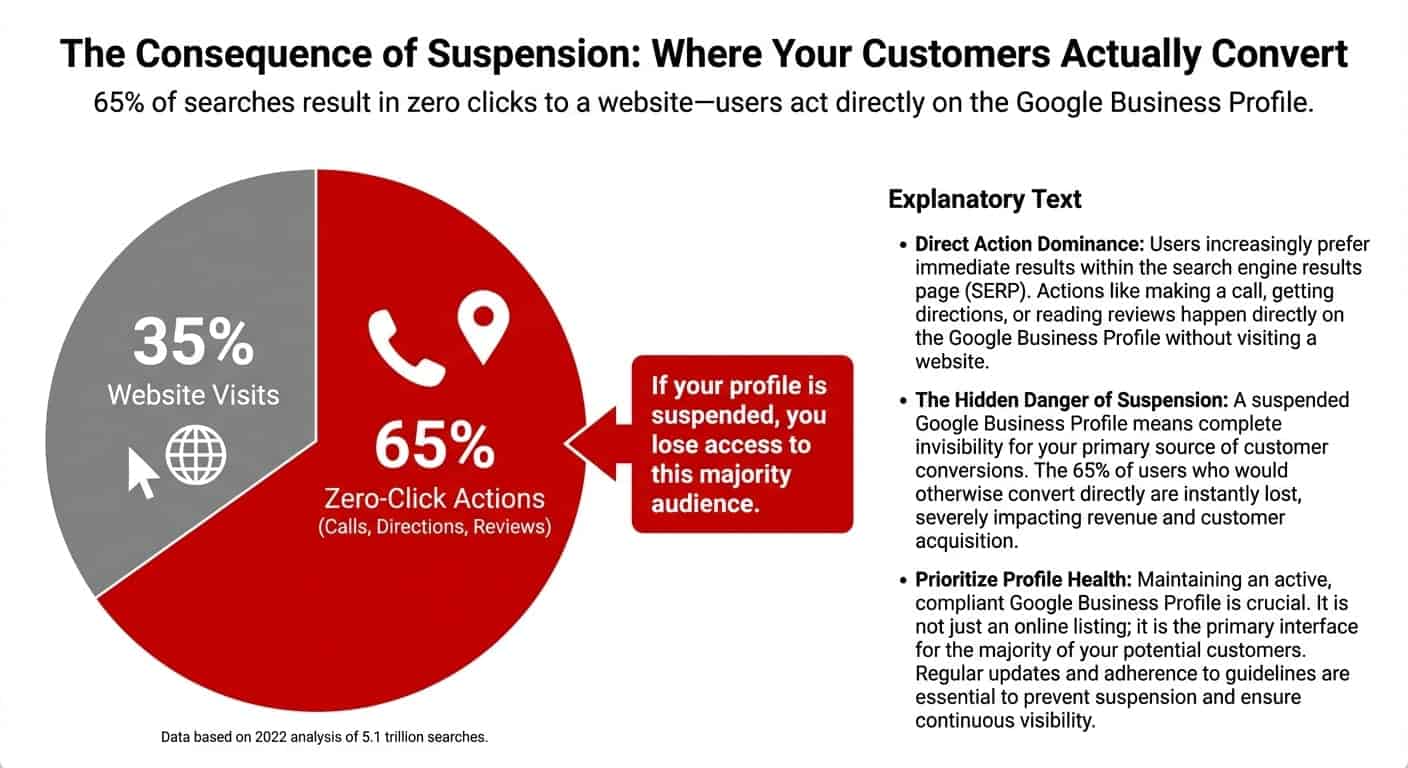
The problem for legitimate service professionals is collateral damage. Because spam detection is largely automated by AI, real businesses often get caught in the dragnet due to minor inconsistencies. The consequences of these “false positives” are severe. A suspension doesn’t just hide your map pin; it freezes your reviews and crashes any connected Local Service Ads (LSA), effectively making you invisible to high-intent customers right when they are ready to buy.
Diagnosing the Penalty: Soft vs. Hard Suspensions
Before you can fix the problem, you must identify what kind of penalty you are facing. Not all suspensions are created equal, and understanding the difference is key to formulating your recovery strategy.
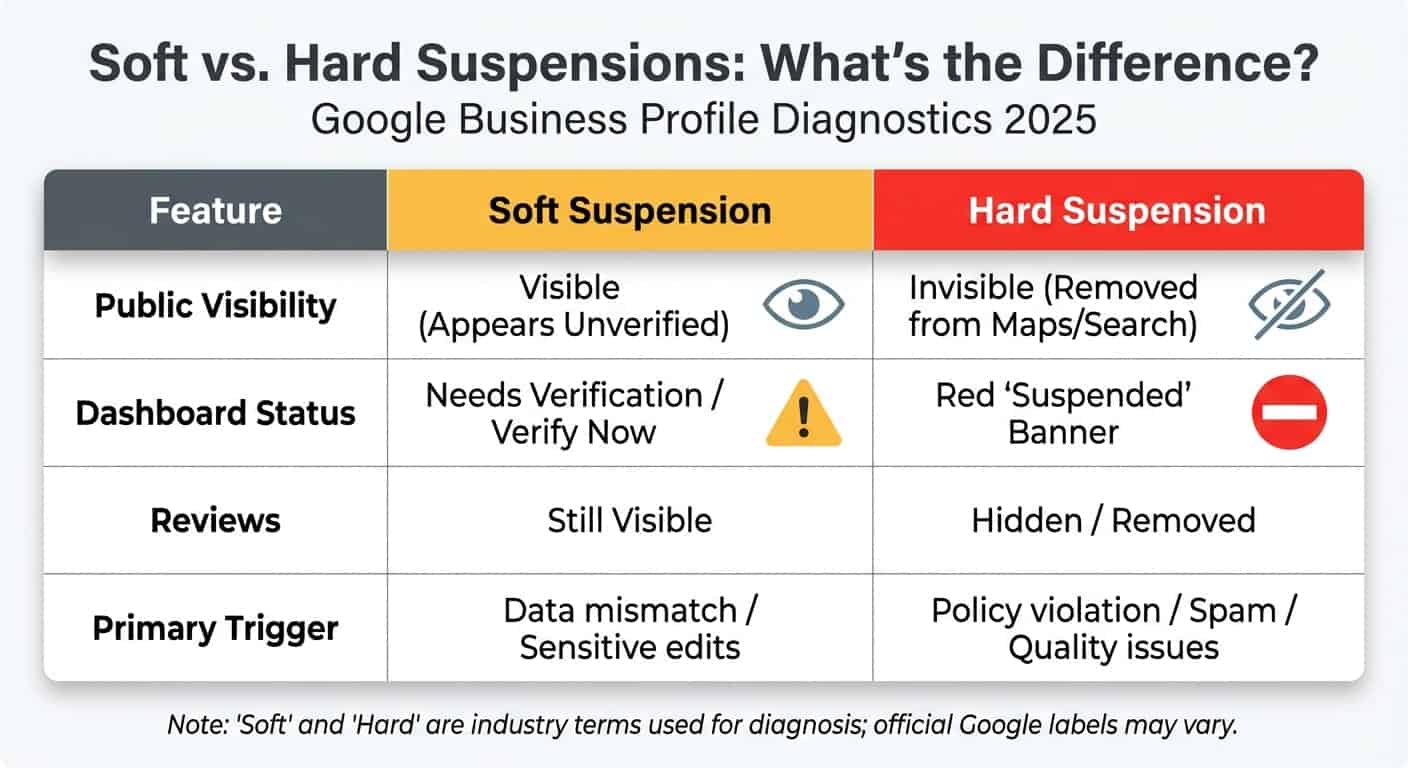
To help you clarify the situation, here is a breakdown of the differences between the two types of penalties:
| Feature | Soft Suspension | Hard Suspension |
|---|---|---|
| Visibility | Business usually remains visible on Maps. | Listing is removed entirely from Maps & Search. |
| Dashboard Status | “Needs Verification” or “Suspended” notice. | Listing is disabled or does not appear. |
| Common Cause | Security measure (suspected hijacking) or sensitive data changes. | Severe policy violations (fake location, keyword stuffing). |
| Impact | Loss of control/management ability. | Complete loss of revenue and leads. |
The Soft Suspension
In this scenario, you lose the ability to manage the profile. When you log into your dashboard, you will likely see a notice that the listing “Needs Verification” or is “Suspended.” This typically happens when Google suspects the account might have been hijacked, or if you made significant changes to sensitive data like your category or address. It is often a security measure rather than a punishment.
The Hard Suspension
This is the nightmare scenario for any business owner. Your listing is removed entirely from Maps and Search results. If a customer searches for your specific business name, you simply won’t appear. This type of suspension is triggered by severe policy violations, such as keyword stuffing, using fake locations, or being flagged as a fraudulent entity.
Top Suspension Triggers for Service Pros
Service Area Businesses (SABs)—those who go to the customer rather than having customers come to them—face higher scrutiny than brick-and-mortar stores. Google’s algorithms are specifically tuned to catch common manipulation tactics used in the service industry.
1. The P.O. Box Trap
Many service pros try to use a UPS Store, P.O. Box, or a “Virtual Office” as their physical address to appear local in a specific city. This is a primary violation. Google cross-references address data with Street View and its own database of commercial locations. If your address is flagged as a mail drop or a non-staffed location, you will likely face a hard suspension.
2. Keyword Stuffing
It is tempting to add descriptors to your business name to rank higher, such as “Lithium Plumbing – Best Drain Cleaner in Dallas.” However, unless that is your legal business name, it is a violation. Competitors frequently use the “Suggest an Edit” feature to report these names. If Google accepts the edit, it often triggers a suspension that requires legal documentation (like a business license) to fix.
3. The “Two-Hour” Rule
If you choose to list a physical office address rather than hiding it as a service area, Google requires that staff be present to serve customers during all stated business hours. If Google determines your office is unmanned—which is common for service pros who are out on jobs—you can be suspended for misrepresentation.
Real-World Example: The “Invisible Locksmith”
Consider a recent case where a business attempted to dominate a metro area by creating listings using multiple fake residential addresses. Google’s algorithms identified the pattern, leading to a simultaneous hard suspension of all profiles. The recovery required consolidating everything into a single, legitimate Service Area Business listing, resulting in weeks of lost revenue.
The New 2025 Reinstatement Protocols
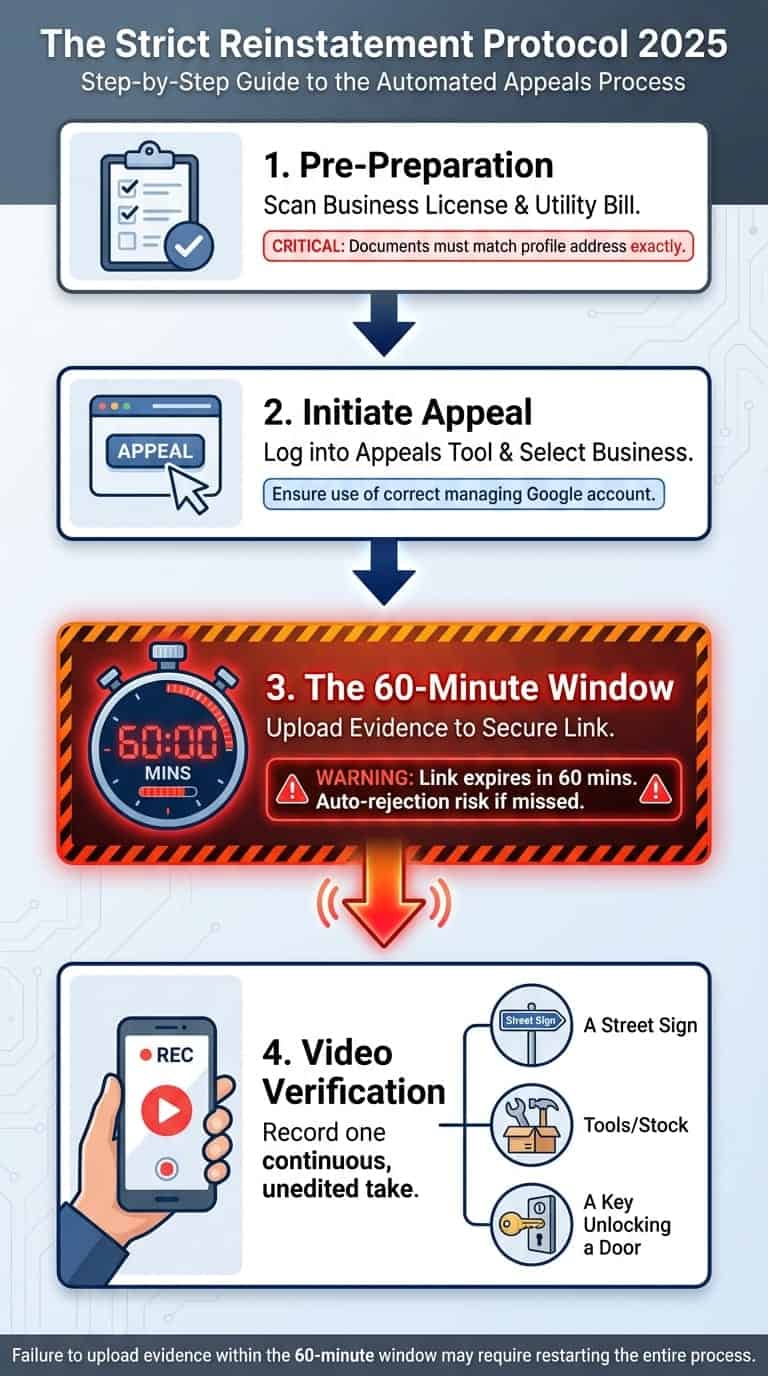
If your profile has been suspended, the road to recovery has changed drastically. In late 2023 and continuing into 2025, Google overhauled the reinstatement process, replacing generic email forms with a more rigorous structured appeal system.
The 60-Minute Timer
The new Appeals Tool introduces a pressure element: a 60-minute timer. Once you initiate the evidence upload process, you have one hour to provide your documentation. This means you cannot start the appeal and “figure it out later.” You must have your utility bills, business registration, and tax documents digitized and ready on your computer before you click the button.
The Shift to Video Verification
The days of verifying via postcard are ending. Google now frequently requires video verification for reinstatement. You may be asked to record a continuous video showing street signs near your location, your branded vehicle, your tools, and the act of unlocking your vehicle or door. For service pros with unbranded trucks or home offices, this can be a significant hurdle that requires careful preparation to prove you are a legitimate entity.
Prevention & The “Rescue Folder”
The best way to handle a suspension is to prevent it from happening in the first place, or at least be prepared for a rapid response. At Lithium Marketing, we emphasize that proactive management is far less costly than reactive recovery.
- Consistency is Key: Ensure your NAP (Name, Address, Phone) matches exactly across the web. Your Google Business Profile should mirror the information found on your website footer, your Secretary of State filings, and your insurance documents. Inconsistencies are red flags for fraud detection algorithms. This alignment is a core component of effective Search Engine Optimization.
- Hide Your Address: If you are a service area business working from home, you must hide your address in the dashboard. Failing to do so can trigger zoning-related suspensions.
The “Rescue Folder” Strategy
We recommend every business owner maintain a digital “Rescue Folder.” This folder should be updated quarterly to ensure you can beat the 60-minute appeal timer without panic. It should contain:
- A utility bill dated within the last 3 months (matching the business address).
- Your business license or LLC filing.
- Photos of your branded equipment and vehicle.
- Proof of insurance.
Final Thoughts
Recovering a suspended Google Business Profile is significantly harder today than it was just a few years ago. With the shift toward AI detection and video verification, the margin for error is slim. The best strategy is strict compliance: ensure your business name, address, and operations align perfectly with Google’s guidelines. Don’t wait until your phone stops ringing to check your profile health. If you are facing a suspension or want to ensure your listing is bulletproof against future updates, proactive management is the only way to secure your digital storefront.
Is Your Business Profile at Risk?
Don’t let a suspension stop your leads. Our team specializes in Google Business Profile management and reinstatement.
References
- Safari Digital. (2024). Local SEO Statistics 2024. Retrieved from Safari Digital
- Google. (2023). How we fought spam on Google Search in 2022. Retrieved from Google Search Central Blog
- Search Engine Land. (2022). Zero-click searches: The definitive guide. Retrieved from Search Engine Land
- Whitespark. (2023). Google Business Profile Suspensions: The Complete Guide. Retrieved from Whitespark
- Google Business Profile Help. (2024). Guidelines for representing your business on Google. Retrieved from Google Support
- Sterling Sky. (2022). Does Keyword Stuffing in Google Business Names Still Work? Retrieved from Sterling Sky
- BrightLocal. (2024). The New Google Business Profile Reinstatement Process. Retrieved from BrightLocal
- Search Engine Roundtable. (2023). Google Business Profile Video Verification: What You Need To Know. Retrieved from Search Engine Roundtable
- Near Media. (2023). Case Study: Fighting Fake Listings in Local Search. Retrieved from Near Media
- Moz. (2023). Troubleshooting Local Ranking Drops & Suspensions. Retrieved from Moz