

Table of Contents
- Why Administrative Work Is Silently Killing Your Profitability
- From Carbon Copy Forms to AI: The Timeline of Contractor Documentation
- How AI Turns Your Rambling Job Site Notes into Professional Documents
- Case Studies: Voice AI in Action Across Different Trades
- Three Ways to Start Turning Voice Notes into Invoices Today
- Final Thoughts
Every contractor knows the drill: You finish a site visit exhausted, covered in dust or grease, and the last thing you want to do is spend another hour hunched over a computer typing up estimates. Yet that paperwork is the barrier between you and getting paid—and the longer you wait, the more likely your potential customer is shopping your competitor. What if you could generate a professional, itemized estimate before you even leave the job site? Not by typing on a tiny phone screen with dirty hands, but simply by talking—the same way you’d explain the job to a colleague. AI-powered voice-to-text technology is transforming how field service professionals handle estimates and invoices. Small business owners spend an average of 14 hours per week on administrative tasks, and for contractors, much of that time is consumed by documentation that could be automated. Meanwhile, research shows that businesses responding to inquiries within one hour are seven times more likely to close the deal than those who wait just two hours. This article breaks down how AI voice agents work, why they’re a game-changer for contractors, and exactly how you can implement them to reclaim your time and win more jobs.
Why Administrative Work Is Silently Killing Your Profitability
Most contractors underestimate how much revenue they lose to delayed estimates and administrative bottlenecks. The numbers tell a sobering story about the real cost of traditional workflows.
Time Drain That Adds Up Fast
The average small business owner spends 14 hours per week on administrative tasks including estimating and invoicing—time that could be spent on billable work. For a contractor charging $90 per hour, that’s potentially $1,260 per week in lost revenue, or over $65,000 annually. And that’s just one person. Multiply that across a team, and the opportunity cost becomes staggering.
The Industry-Wide Productivity Problem
The construction and trade sectors have historically suffered from productivity issues due to reliance on manual, analog processes. While other industries have embraced digital transformation, many contractors still operate with workflows that would have been familiar to tradespeople decades ago. This productivity gap isn’t just inconvenient—it’s a competitive disadvantage that compounds over time.
The Speed-to-Lead Problem
Customers make decisions fast. If you take 24-48 hours to deliver an estimate while a competitor sends one in an hour, you’ve likely lost the job before your email even arrives. In today’s instant-gratification economy, homeowners expect rapid responses. They’re often contacting multiple contractors simultaneously, and the first professional estimate they receive usually wins their business—regardless of whether it’s the lowest bid.
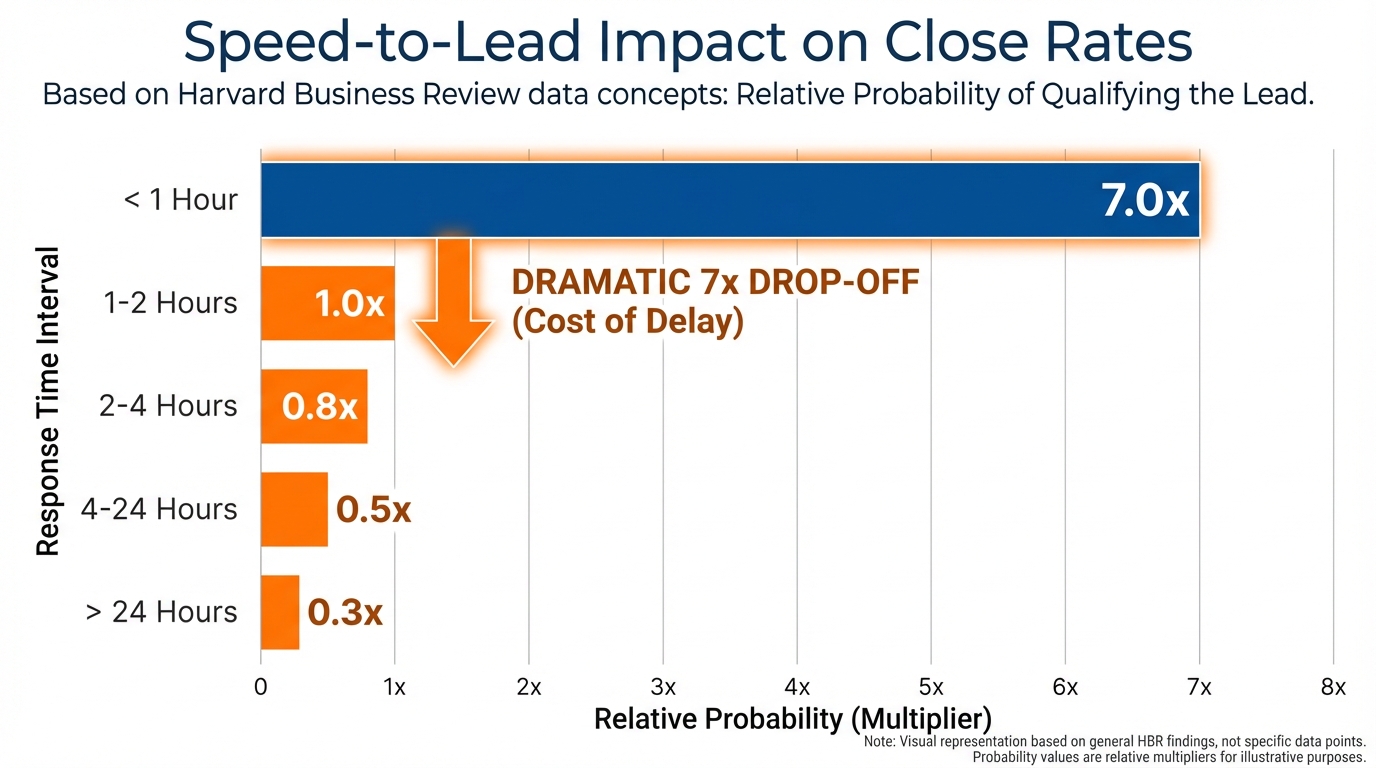
The chart above illustrates the dramatic relationship between response time and conversion rates. Notice how the probability of closing a deal drops precipitously after the first hour. This isn’t just about customer service—it’s about capturing revenue before it walks out the door.
Physical and Mental Burnout
After a physically demanding day in the field, forcing yourself to sit at a computer and format estimates leads to procrastination, errors, and eventual burnout. Many contractors find themselves working late into the evening, sacrificing family time and personal health to keep up with paperwork. This unsustainable pattern is why talented tradespeople leave the industry or struggle to scale beyond solo operations.
Error-Prone Manual Calculations
Handwritten or hastily typed estimates are susceptible to math errors, missing line items, and inconsistent pricing—all of which hurt your professional image and bottom line. A transposed digit or forgotten material cost can mean the difference between a profitable job and one that costs you money. Even worse, inconsistent pricing between similar jobs can create customer service issues when word gets around.
From Carbon Copy Forms to AI: The Timeline of Contractor Documentation
Understanding where we’ve been helps contractors appreciate the technological leap AI represents. The evolution of estimate generation reveals three distinct eras, each with its own strengths and fatal flaws.
Era 1: Pen & Paper (Pre-2010s)
Handwritten carbon-copy quotes filled out in trucks were the standard for decades. The advantage was immediacy—you could hand a customer an estimate on the spot. The problems were numerous: unprofessional appearance, calculations done by hand (and often wrong), illegible handwriting, zero integration with accounting systems, and no way to track whether estimates were even sent or received.
Era 2: Digital Templates & CRMs (2010s-2022)
Tools like Jobber, ServiceTitan, and Housecall Pro brought professionalism and integration with bookkeeping, but still required manual typing—difficult when you’re wearing gloves or have dirty hands. These platforms represented a massive step forward in terms of professional presentation and business intelligence, but they didn’t solve the core problem: data entry fatigue. The UI fatigue is real. After diagnosing a complex HVAC issue, the last thing a technician wants to do is navigate through multiple dropdown menus on a small phone screen to build an estimate. The cognitive load of translating a mental job assessment into a structured digital form creates friction that leads to delays and errors.
Era 3: AI Voice-to-Text Agents (2023-Present)
Contractors dictate naturally, and AI instantly parses the information, performs calculations, and generates ready-to-send PDFs. Zero manual typing required. This paradigm shift eliminates the translation step between assessment and documentation.
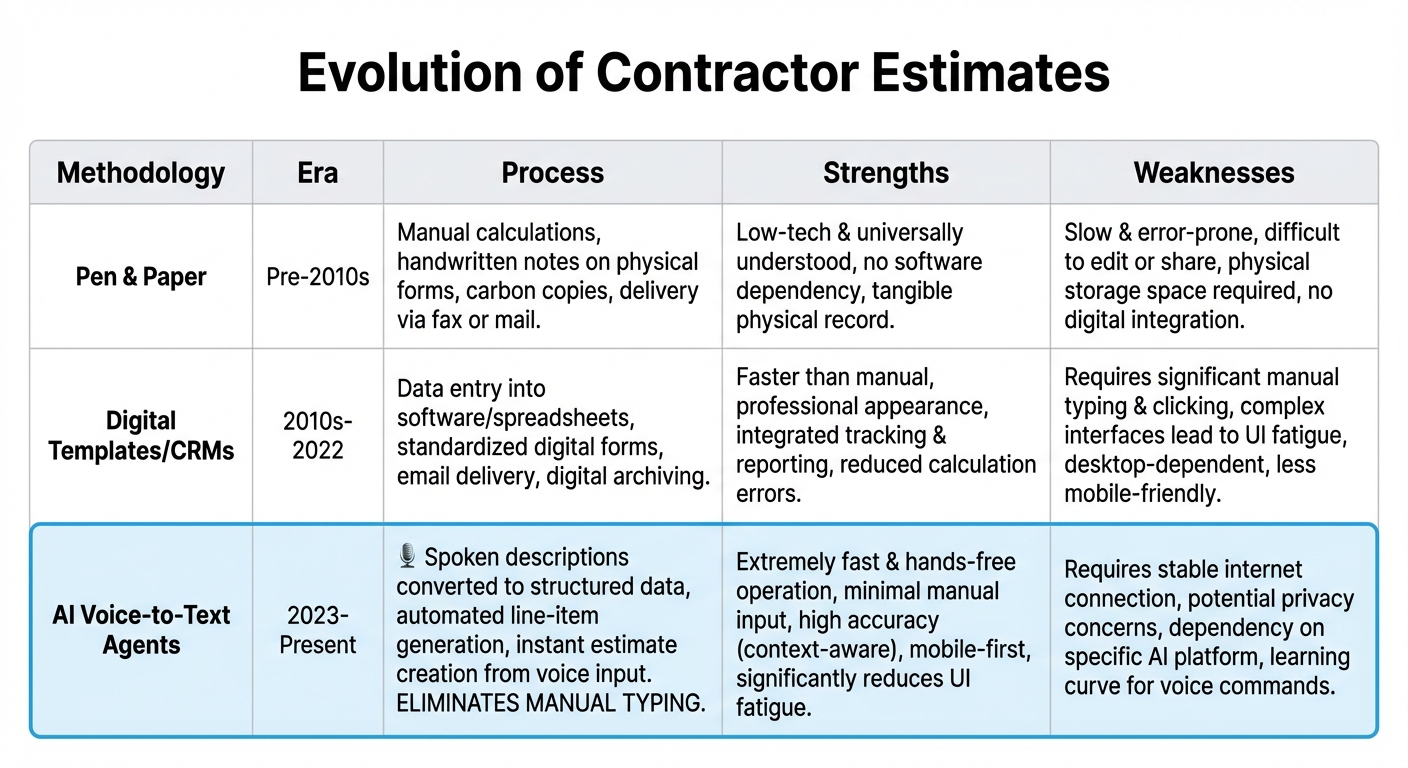
The image above provides a comprehensive comparison of these methodologies. Notice how AI voice agents retain the immediacy advantage of the pen-and-paper era while delivering the professionalism and integration of modern CRM systems—without the data entry bottleneck.
The Paradigm Shift
Moving from “data entry” to “data dictation” fundamentally changes the contractor experience. Instead of translating your thoughts into a computer’s language, you simply speak naturally—the same way you’d explain the job to your apprentice or the customer. The AI handles the translation, formatting, and calculation, freeing your brain to focus on the actual trade work rather than administrative gymnastics.
How AI Turns Your Rambling Job Site Notes into Professional Documents
Let’s demystify the “black box” of AI voice agents by explaining the two core technologies that make this magic possible.
Automatic Speech Recognition (ASR): Finally Good Enough for Job Sites
Modern ASR models like OpenAI’s Whisper are trained on 680,000 hours of multilingual audio data, achieving near-human accuracy even in noisy job site environments with heavy accents and industry jargon. This is the critical breakthrough that makes contractor-focused voice AI viable.
Why Older Voice Tech Failed Contractors
Early Siri or basic smartphone dictation couldn’t handle background noise (saws, drills, traffic) or specialized terminology (P-traps, compressors, grading). If you tried dictating an estimate with a concrete mixer running in the background, you’d end up with gibberish. And forget about technical terms—the AI would interpret “HVAC compressor replacement” as “have a sea compressor replacement” or similar nonsense.
New ASR models are exponentially more robust because they’re trained on vastly more diverse data, including construction site recordings, technical manuals, and trade-specific vocabulary. They can distinguish between a “two-ton unit” and “tuna” even with a jackhammer operating nearby.
Large Language Models (LLMs) and Entity Extraction
Once your voice note is transcribed, AI models like GPT-4 or Claude perform “semantic entity extraction”—identifying line items, materials, labor hours, rates, and modifiers like discounts or rush fees.
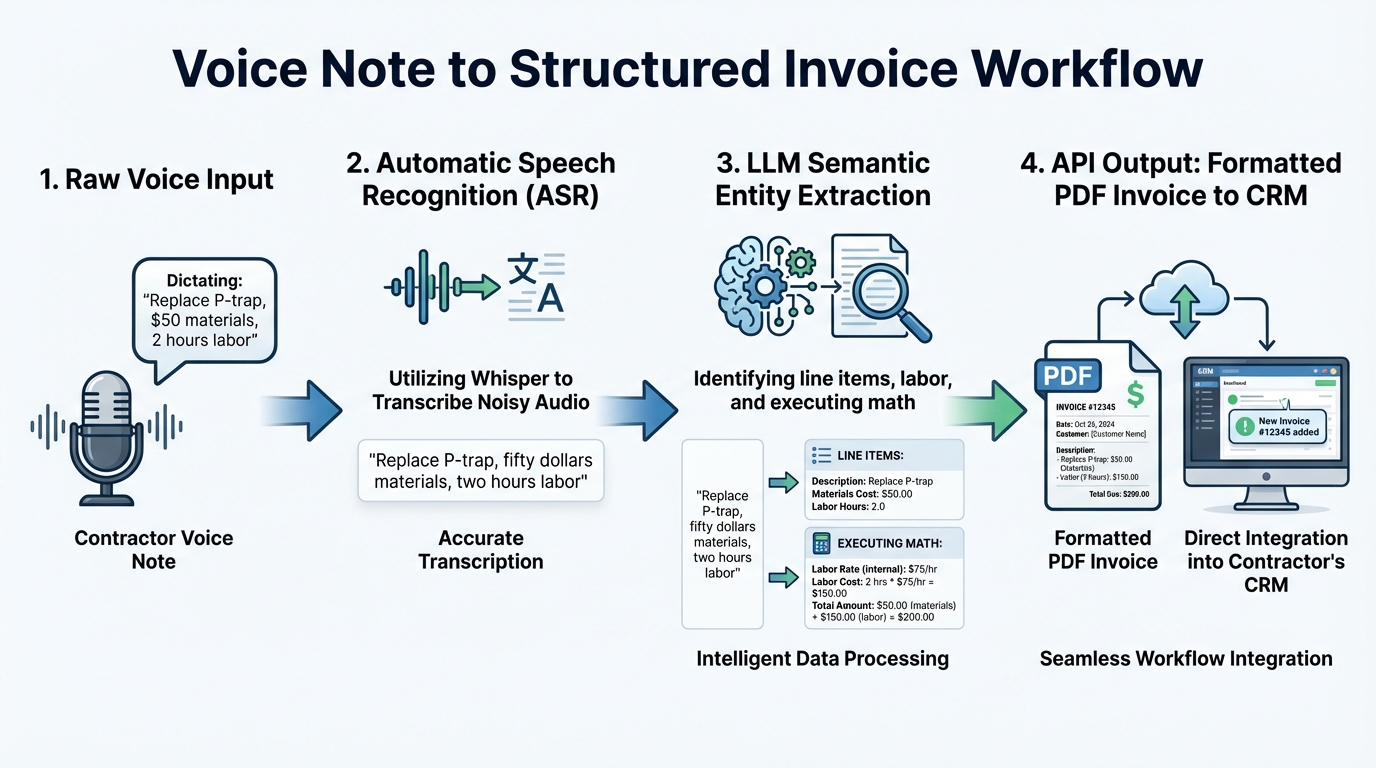
The workflow diagram above illustrates this process. Let’s walk through a concrete example of how it works in practice.
Example Workflow in Action
You say: “We need to replace the P-trap, materials are about fifty bucks, two hours labor at ninety an hour, add a 10% military discount.” The AI extracts and structures this information:
- Line Item: P-trap replacement
- Materials: $50.00
- Labor: 2 hrs @ $90/hr = $180.00
- Modifier: 10% military discount
- Subtotal: $230.00
- Discount: -$23.00
- Total: $207.00
All of this happens in seconds. The AI doesn’t just transcribe your words—it understands the semantic meaning and business logic behind them.
Output Integration: From Structured Data to Finished Invoice
The AI sends this structured data (often via JSON/API) directly into your CRM, QuickBooks, Stripe, or invoicing platform—generating the final document automatically. Most modern business software has API access, meaning the AI can “talk” to your existing tools without requiring you to switch platforms or learn new systems. The result is a professional, branded estimate or invoice that looks like you spent 30 minutes formatting it, delivered to the customer’s inbox before you’ve left their property.
Case Studies: Voice AI in Action Across Different Trades
Concrete examples reveal how HVAC techs, landscapers, and plumbers are using AI voice agents to close more jobs and reclaim their evenings.
Case Study 1: HVAC Sales Cycle Acceleration
The Scenario: An HVAC technician diagnoses a faulty compressor during a service call. The unit is 8 years old, still under extended warranty for labor but not parts. The customer is a retired veteran.
Old Workflow:
- Write down part number on clipboard
- Drive back to office (20-30 minutes)
- Cross-reference supplier catalogs for current pricing
- Calculate labor hours and apply veteran discount
- Manually create estimate in Word or CRM
- Email customer 2-4 hours after leaving their home
Result: Customer has already called two other HVAC companies. One responds faster. You lose the job.
AI Workflow:
- Technician opens voice app while still in customer’s mechanical room
- Dictates: “Quote for John Doe, address 123 Main Street. 3-ton compressor replacement, Carrier part number XYZ-123. Standard install, four hours labor. Customer is military, apply 10% veteran discount. Note warranty covers labor, so we’re only invoicing parts and disposal fee.”
- AI queries connected supplier database for current price of part XYZ-123
- Applies company’s standard labor rate and disposal fee
- Calculates veteran discount
- Generates professional PDF estimate
- Automatically sends via SMS and email to customer
Result: Customer receives professional, itemized estimate before the technician has backed out of their driveway. The speed and professionalism create immediate trust. Close rate increases dramatically.
This aligns with research showing that 82% of small businesses using AI report increased productivity. But it’s not just about being faster—it’s about being first and looking professional while doing it.
Case Study 2: Landscaping Multi-Phase Projects
The Scenario: A landscaping company is bidding on a complete backyard transformation: grading, hardscaping, planting, and irrigation. The complexity requires detailed phase breakdowns to help the customer understand the scope and timeline. Old Workflow: Would require sitting at a desk for 60-90 minutes with Excel or Word, manually organizing the phases, line items, and subtotals. By the time the estimate is ready, mental fatigue has set in and the document quality suffers. AI Workflow: Lead contractor walks the property with smartphone, dictating organically:
“Okay, this is the Thompson project. Phase one is backyard grading and prep, we’re looking at 8 hours labor, one skid steer rental for two days, plus haul-away fees for the old sod. Phase two is hardscaping, 400 square feet of pavers, materials will run about 3 grand, labor is going to be 24 hours with a two-man crew. Phase three is planting and landscape design, we’ll need to bring in topsoil, install the drip irrigation, six large specimen trees, call it 16 hours labor plus materials. Add a 5% project management fee to the total.”
Result: The AI automatically categorizes the estimate into clearly labeled “Phase 1,” “Phase 2,” and “Phase 3” sections with professional headers and subtotals for each phase. What would have been an hour and a half of formatting becomes a 5-minute voice note, and the customer receives a document that looks like it came from a $10M landscaping firm.
The Competitive Advantage
In both cases, being the first to respond with a professional estimate is the difference between winning and losing the job. This directly correlates with the speed-to-lead research: the faster you respond, the exponentially higher your close rate. AI voice agents don’t just save time—they fundamentally change your competitive position in the market.
Three Ways to Start Turning Voice Notes into Invoices Today
Understanding the technology is one thing; implementation is another. Here are three actionable pathways for contractors at different tech comfort levels and business sizes.
Option 1: Low-Code Automation (For DIY-Minded Contractors)
Tools Needed: Zapier (or Make.com) + OpenAI API + QuickBooks or Invoice software How It Works:
- Record voice note on smartphone using built-in voice memos or Google Keep
- Save recording to designated cloud folder (Google Drive or Dropbox)
- Zapier detects new file and automatically sends audio to OpenAI Whisper API for transcription
- Transcribed text is sent to GPT-4 with custom prompt: “Extract line items, material costs, labor hours, rates, discounts, and calculate totals. Format as JSON.”
- Structured JSON data auto-populates QuickBooks invoice template fields
- Completed invoice is automatically emailed to customer with branded PDF attachment
| Pros | Cons |
|---|---|
| Low monthly cost ($20-50 for Zapier + OpenAI usage) | Requires basic technical setup and some trial and error |
| High customization to your specific workflow | Need to maintain automation if APIs change |
| No vendor lock-in | Learning curve during initial configuration |
Best For: Tech-savvy contractors who want maximum control and minimal ongoing costs
Option 2: Dedicated AI Field Service Apps
Emerging Platforms: ServiceTitan, Jobber, and Housecall Pro are beginning to integrate native AI voice dictation features into their mobile apps. How It Works: Simply press a “Dictate Estimate” button in the mobile app, speak naturally about the job, and the app generates the estimate within its existing workflow. Since the AI is trained specifically on field service terminology and integrated with your pricing database, accuracy is high right out of the box.
| Pros | Cons |
|---|---|
| Zero technical setup required | Feature availability varies by platform |
| Seamless integration with existing CRM | May require upgraded subscription tier |
| Customer support included | Less customization than DIY approach |
| Mobile-optimized interface | Dependent on vendor’s development roadmap |
Best For: Contractors already using these platforms who want the simplest possible implementation
Option 3: Custom AI Agents (For Established Contracting Firms)
Best For: Companies doing $1M+ annually or those with unique, complex pricing models that don’t fit standard templates How It Works: Marketing and tech agencies like Lithium Marketing build bespoke AI agents using frameworks like LangChain, fine-tuned to understand your specific business rules:
- Company-specific pricing formulas and margin targets
- Material markup percentages that vary by job type
- Regional cost variations for multi-location businesses
- Preferred supplier catalogs with real-time pricing integration
- Seasonal adjustment factors
- Customer-specific contract terms
The AI Agent Development Process:
- Business analysis: Agency analyzes your current estimation process, pricing rules, and pain points
- Data integration: Connects to your supplier databases, accounting software, and CRM
- Custom training: AI is fine-tuned on your historical estimates to learn your patterns
- Voice interface design: Creates natural language prompts optimized for your workflow
- Testing and refinement: Pilot program with select technicians to identify edge cases
- Full deployment: Rollout across team with training and ongoing support
| Pros | Cons |
|---|---|
| Fully customized to exact business logic | Higher upfront investment ($5K-25K) |
| Maximum accuracy for complex scenarios | Requires technical partner relationship |
| Competitive differentiation through proprietary tech | Longer implementation timeline |
| Scales with your company | Ongoing partnership required for updates |
Best For: Established firms ready to make a technology investment that creates lasting competitive advantage
Getting Started Checklist
Regardless of which option you choose, follow these steps:
- ✅ Audit your current estimate workflow: Time how long estimates actually take from start to customer delivery. Identify specific bottlenecks.
- ✅ Choose implementation tier based on annual revenue, tech comfort level, and workflow complexity
- ✅ Start with one service type: Don’t try to automate everything at once. Pick your highest-volume service (e.g., only HVAC repairs, or only residential plumbing) for the pilot
- ✅ Train AI with sample voice notes: Record 10-20 typical estimates to help the system learn your terminology and pricing patterns
- ✅ Monitor close rates before and after: Track conversion metrics to quantify ROI and identify areas for improvement
The contractors who implement these systems first will have a significant competitive advantage. While competitors are still typing estimates at 10 PM, you’ll be having dinner with your family, knowing your estimates have already been sent and are converting at higher rates.
Final Thoughts
For too long, contractors have been trapped in a cycle: spend all day doing physically demanding work, then spend all evening doing the paperwork to get paid for it. It’s unsustainable, and it’s why so many talented tradespeople burn out or can’t scale their businesses. AI voice-to-text technology breaks that cycle. By letting you dictate estimates the same way you’d explain a job to a colleague, these tools eliminate hours of manual data entry, reduce errors, and—most importantly—allow you to respond to customers while the iron is hot. When you can send a professional, itemized estimate before you leave the job site, you’re not just saving time; you’re winning more work. The technology is here. It’s affordable. And it’s already being used by forward-thinking contractors to reclaim hundreds of hours per year while increasing their close rates. The question isn’t whether voice AI will transform the trades—it’s already happening. The only question is: how much longer can you afford to wait while your competitors pull ahead?
Ready to Automate Your Estimating Workflow?
Lithium Marketing specializes in implementing AI systems for field service businesses.
References:
- SCORE Association. (2022). How Small Business Owners Spend Their Time (Infographic). https://www.score.org/resource/infographic-how-small-business-owners-spend-their-time
- Harvard Business Review. (2011). The Short Life of Online Sales Leads. https://hbr.org/2011/03/the-short-life-of-online-sales-leads
- McKinsey & Company. (2023). Artificial intelligence: Construction technology’s next frontier. https://www.mckinsey.com/capabilities/operations/our-insights/artificial-intelligence-construction-technologies-next-frontier
- Radford, A., Kim, J. W., Xu, T., Brockman, G., McLeavey, C., & Sutskever, I. (OpenAI). (2022). Robust Speech Recognition via Large-Scale Weak Supervision (Whisper). https://arxiv.org/abs/2212.04356
- U.S. Chamber of Commerce. (2023). Empowering Small Business: The Impact of Technology on U.S. Small Business. https://www.uschamber.com/small-business/empowering-small-business-the-impact-of-technology-on-us-small-business