


The core rule
One ad promise needs one page that keeps it.
A landing page for a service business is one page built for one ad or campaign: it repeats the ad’s promise in the headline, proves you can deliver it and makes calling or requesting a quote the obvious next step. Everything on the page serves that one job. If the ad says “Same-day water heater repair in Tacoma,” the page should say the same thing in its first line, not “Welcome to our family-owned company.”
Sending ad clicks to your homepage is a common and costly mistake. The homepage has to talk to every customer about every service, so the person who clicked a water heater ad has to hunt for water heaters again. Some will. Many hit the back button and click the next ad, and you paid for the click either way.
Start with the ad. Write down the service, the town and the promised next step. The landing page headline and first paragraph should answer that same request. Google’s landing page guidance makes the same point: match the ad text and keywords to the page and make the call to action clear. It is written for Smart campaigns, and the rule holds for every campaign type.
Top to bottom
The sections of a landing page that books jobs.
Strong service landing pages tend to follow the same order, because it follows the questions a customer asks in their head. Can you do this job? Can I trust you? What will it cost me in time and money? How do I start?
A headline that repeats the ad
Same service, same town, same promise. The visitor should know in two seconds they landed in the right place.
Call button and short form up top
Tap-to-call and a four-field form in the first screen on a phone. No scrolling to find them.
Proof right under the fold
Your Google rating, license number, warranty and years in business, each one specific.
What the job includes
A short list of what you do, what it covers and the towns you serve.
Photos of your own work
Real jobs and your real crew. Before-and-after shots work well for most trades.
A few steps and a few answers
How the job goes from call to done, and answers to the two or three questions people ask before booking.
Finish with the call button and form again. Someone who read the whole page is ready, so do not make them scroll back up.
Trust
Show proof for the exact service in the ad.
Proof works best when it matches the job. On a roof replacement page, show roofs you replaced, a review that mentions a roof and the warranty on the roof. A general review about friendly service helps, but a review that describes a roof replacement, the timeline and the cleanup sells the job on that page.
Keep the page focused without stripping out trust. A buyer still wants to know who will show up, what happens after the form and whether you handle their situation. Put your license number and Google rating near the top. Use real photos of your crew and trucks. If a question needs a longer answer than the page can hold, link to your full service page.
Leave out what a visitor cannot verify. Unnamed testimonials, vague awards and stock photos of smiling technicians read as filler and can make the real proof look fake. Our website trust signals guide covers what to include.
The form and the phone
A paid click only pays off when the request reaches you.
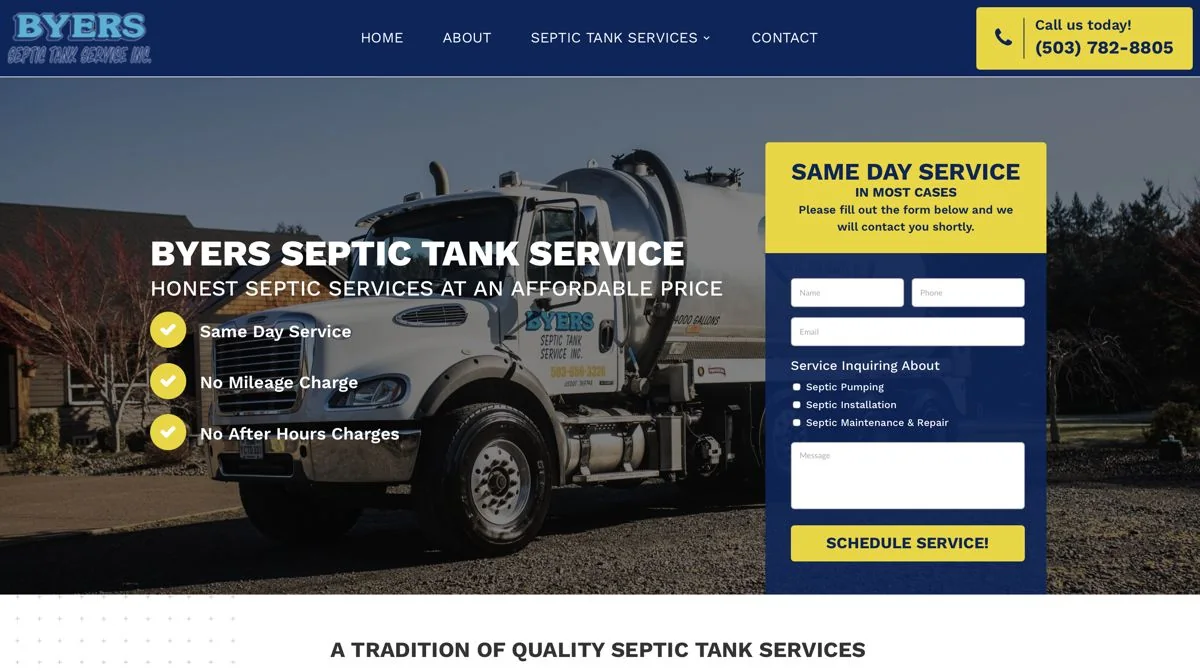
Ask only what your office needs to call back: name, phone, the service and a line about the job. Each extra required field gives a visitor one more reason to quit. A dropdown or checkboxes for the service help the person calling back. Byers Septic Service’s homepage does this well: a short form in the first screen with checkboxes for pumping, installation and repair, and a schedule-service button.
Test the page on a phone before you spend a dollar on traffic. Tap the phone number, submit the form, check who gets it and how fast. Google’s destination experience policy expects a working, functional site, and a broken form wastes the click anyway.
Tracking and testing
Judge the page by calls and booked jobs.
Track every phone call and form from the page as a conversion in Google Ads, using a call tracking number on the page so you can tell ad calls from everything else. Then compare pages by the calls and quote requests they produce, and by how many of those turn into booked jobs. Page visits and time on page tell you very little.
Test one change at a time: a new headline, a shorter form, a different hero photo. Change three things at once and you will not know which one worked. Give each test enough traffic to mean something before you call it.
Lithium’s Google Ads service includes landing pages built by search intent and conversion tracking for calls and forms. Management starts at $500 a month plus ad spend, with no haggling and no hidden upsells.
Common mistakes
Five ways service landing pages waste ad money.
Sending every ad to the homepage
The visitor has to find the service again. Build or pick a page that matches each ad group.
A headline that ignores the ad
If the ad says same-day and the page never mentions it, the visitor assumes the ad was bait.
A long form
Ten required fields on a phone is a lost lead. Ask for four and get the rest on the call.
A slow page
Heavy images and sliders make phone visitors leave before the page loads.
No call tracking
Without it you cannot tell which ads and pages make the phone ring, so you cannot fix the ones that do not.